
Since Microsoft is retiring default outbound connectivity for Azure Virtual Machines, we should have a look at the other options.
Don’t panic … yet
At the time of writing, the retirement was announced for 30 September, 2025, almost two years away.
But since we all know how long projects and especially migration projects can drag on, my advice at the time was not to wait too long with planning.
Furthermore, I recommend not deploying new workloads this way from now on. It was never really a good idea, by the way: no control over the public IP of the machine, risk of using up NAT space quickly, no inbound connections possible, etc.
General approach
It is generally not a good idea to allow VMs direct access to the Internet. Normally, we have a hub and spoke architecture in Azure and traffic from a VM in a spoke is routed through a firewall in the hub. In this case, nothing changes.
But of course, there are test environments, isolated systems, or very small deployments where such access needs to be enabled directly from the VM. So…
What are our options?
Attach a public IP address
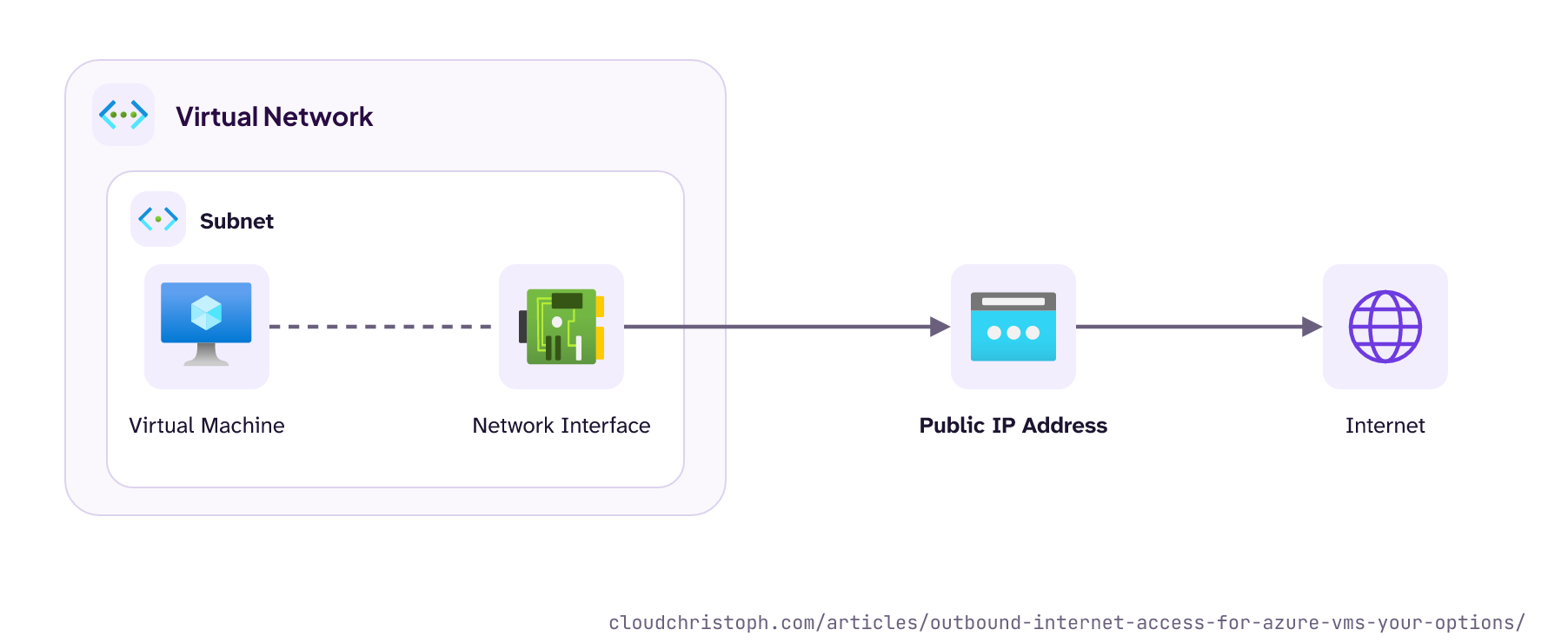
You can attach a Basic or Standard Public IP address to the NIC. I wouldn’t use Basic: those were retired on 30 September 2025. Existing ones keep running, but without support and SLA.
You can add either a Public IPv4 or IPv6 to the interface. For IPv6, you’ll have to add an IPv6 range to your VNET and the subnet and add a new IP Configuration to the NIC before attaching this Public IP. If you attach a Public IPv4, you can do this directly to the first IP configuration.
I recommend this approach, if you have only a few VMs within this VNET. A public IP on the NIC is also an explicit outbound method, so it keeps working in a private subnet. If you choose an IPv4 this IP will cost you money. IPv6 addresses are free of charge, but bandwidth is billed at the same rates as for IPv4. You’ll still pay for outgoing bandwidth with both options.
Keep in mind: Standard Public IP addresses are closed by default for incoming connections, so you have to attach a Network Security Group (NSG) which allows Internet access to the NIC of the VM or the subnet the VM NIC is deployed to, to get connectivity from the outside. Allowed connection to Internet is one of the default rules of an NSG, so you actually don’t have to change anything else within the NSG (though you should).
Costs: Free (Public IPv6) or low (Public IPv4, €3.21*)
Use an Azure Load Balancer
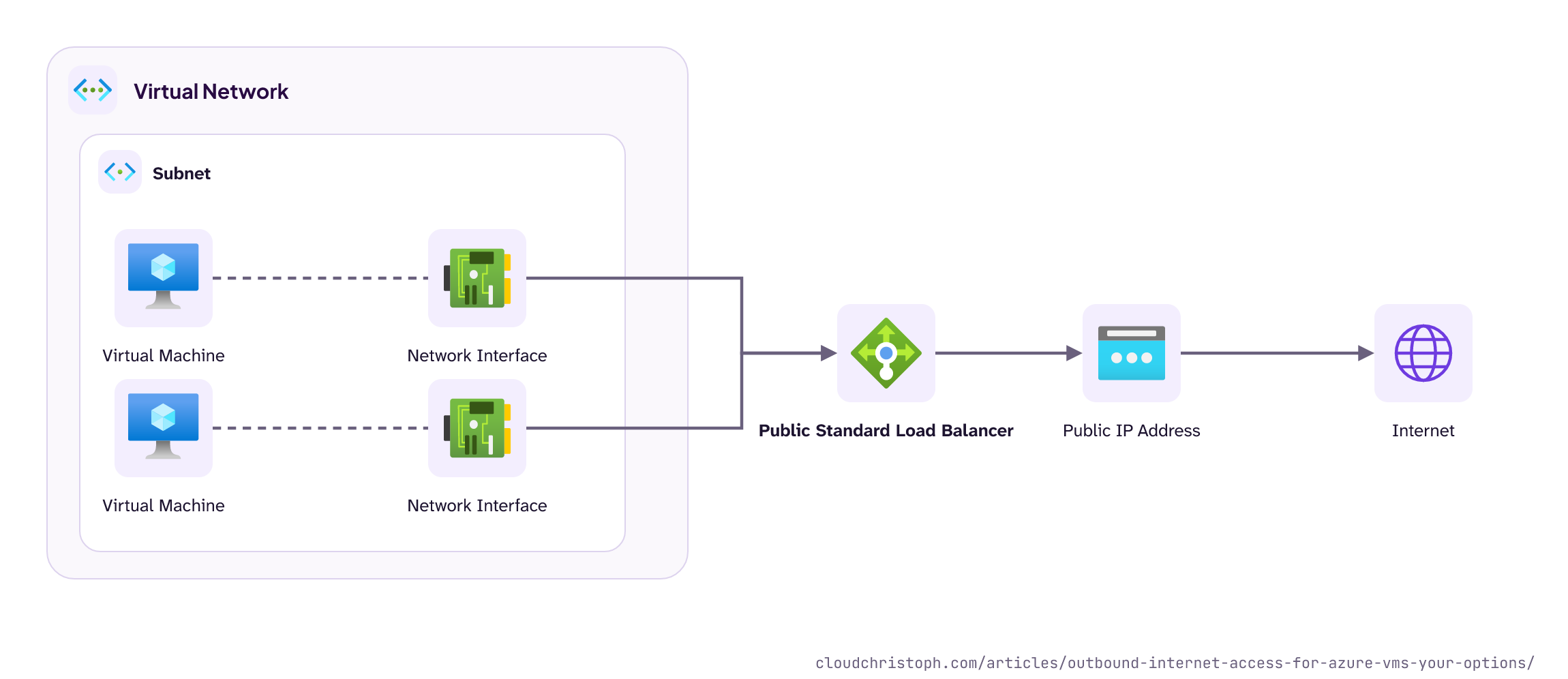
A public Standard Azure Load Balancer (LB) can be configured with Outbound Rules. So if you add your VMs to a Backend Pool on the LB, the LB will be used for outgoing traffic, as long as the VM has no public IP on its own NIC.
Using only one Public IP can be an upside (costs), but only if you have more than ~4 VMs using the LB.
To be honest, I wouldn’t recommend this approach. The SNAT ports are preallocated per VM and shrink as the pool grows (1,024 ports each for up to 50 VMs, 512 for up to 100, and so on). Microsoft itself says not to use the default allocation for production workloads. Only if you also have to provide inbound connectivity, I think this can be a viable option.
Costs: Okay (Standard Load Balancer €16.06* + data processed by LB €4.51* for 1 TB + Public IP €3.21*)
Use an Azure NAT Gateway
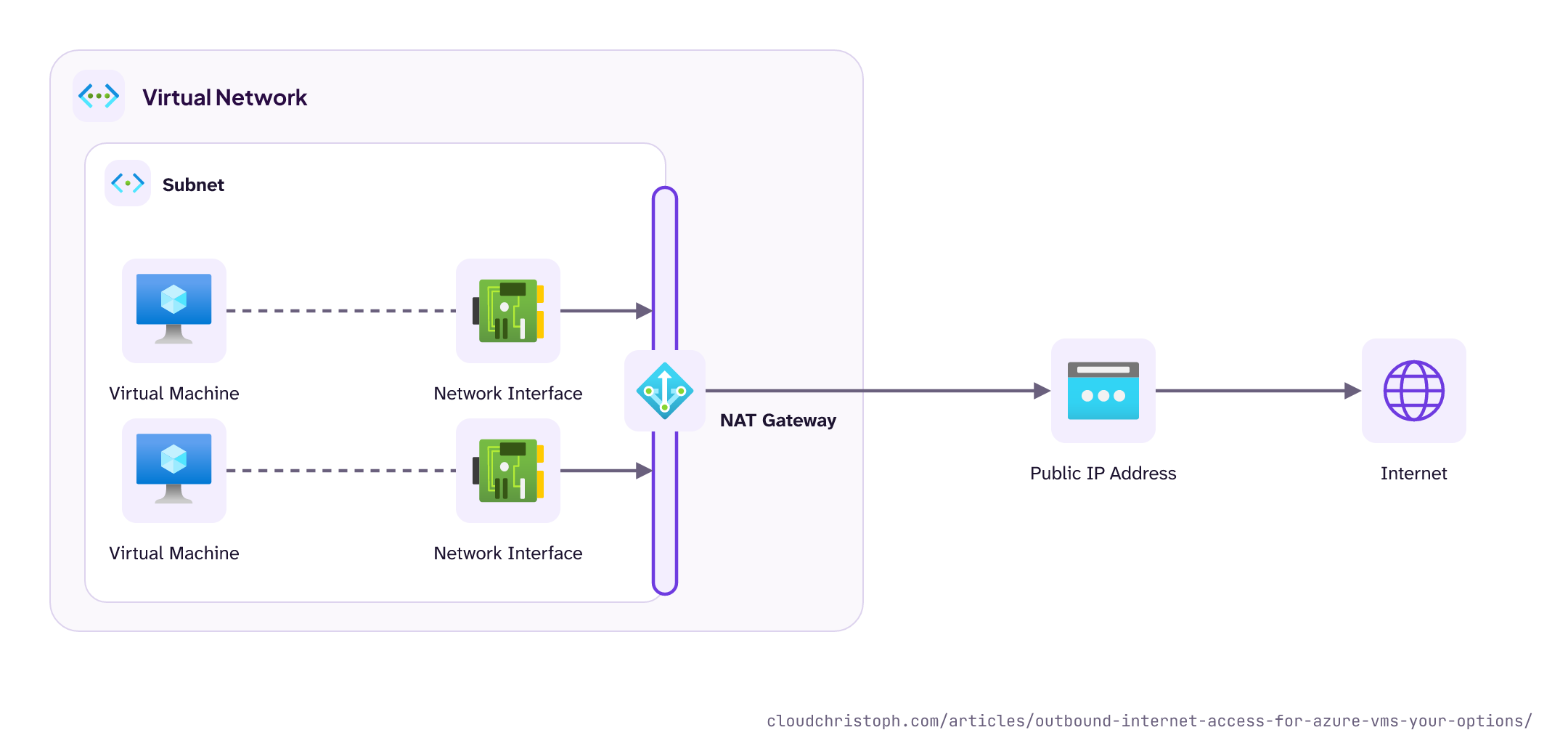
An Azure NAT Gateway gives you SNAT port functionality for automatically scaling outbound connectivity and reduces the risk of SNAT port exhaustion. Each public IP address on the gateway brings 64,512 SNAT ports, you can add up to 16 of them, and the ports are allocated dynamically instead of being reserved per VM. It’s not possible to use it for inbound connectivity (of course), but you can add another Public IP to the VM NIC or use another Load Balancer for this.
Microsoft calls it the method it recommends for outbound connectivity, and it takes precedence over a load balancer, an instance-level public IP and Azure Firewall. Only a UDR to an appliance or gateway beats it. The newer StandardV2 SKU is zone redundant and costs the same as Standard, so look at it first for new deployments (regional availability and the missing upgrade path from Standard are the catch).
I would recommend this, if you have many VMs within your VNET and cannot live with the risk of exhausting your SNAT ports. My interpretation: For anything that is not a tiny test setup, this is the better default than the load balancer now.
Costs: Questionable (my opinion!) (NAT Gateway €28.91* + data processed by NAT Gateway €40.55* for 1 TB + Public IP €3.21*)
Route it through a firewall
The fourth option is not really a workaround, it’s the architecture from the beginning of this post: a UDR with 0.0.0.0/0 and the private IP of an Azure Firewall (or another NVA) as next hop sends all Internet traffic through the hub. Microsoft lists a firewall or NVA with a UDR as an explicit outbound method too (the UDR itself is just a default route to the firewall), and a UDR to a virtual appliance overrides a NAT gateway on the same subnet.
The firewall then needs enough SNAT ports of its own. Azure Firewall gives you 2,496 SNAT ports per public IP and instance. If that is not enough, associate a NAT gateway with the AzureFirewallSubnet, which needs no extra UDR for that traffic. With the NAT gateway in place, outbound SNAT uses the gateway’s IP, while inbound DNAT still uses the firewall’s own public IP.
Costs: Depends on the SKU. This is the expensive option, but you get filtering and logging for it.
Conclusion
I still strongly recommend avoiding all of the first three options and building a reasonable Hub-and-Spoke architecture with a firewall as the way out (see above). Direct connection to the Internet is mostly a security nightmare.
But if you want to use it for test scenarios or very small deployments, then use the first option (Public IP) if possible. If you need to provide inbound connectivity for multiple VMs or VM scale sets anyway, use the load balancer. In all other cases, and above all where SNAT port exhaustion is a risk, use a NAT gateway.
Please remember: This reflects only my personal opinion, which does not have to be that of Microsoft or my employer. Your feedback is always welcome!
* = based on retail prices as of October 2026 in the Azure Region West Europe; Your costs might be different
Changelog
- Added the current state of default outbound access (private subnets), updated Basic public IP, SNAT and NAT gateway details, added a firewall section, refreshed prices and added documentation links.
- First published.
Was this useful?
Noted. If you don't want to miss the next one: add yourself to the list ↓

Comments