
In part 1 we looked at the client. The other end of every session is the session host, and its host pool has its own set of switches for RDP Shortpath. On paper, those switches let you pick which UDP paths are allowed (and of course I wanted to see that in action). In practice, I learned two things: the defaults are good, and turning off one path to force another can leave you with none.
Managed and public, in Microsoft’s words
Microsoft splits RDP Shortpath into two families, and the names cause confusion, so let’s get them out of the way first.
The four host pool switches
Since the host pool API gained them, a host pool has four properties for RDP Shortpath (configure RDP Shortpath):
| Property | Path it controls |
|---|---|
ManagedPrivateUdp |
Managed networks with the listener (UDP 3390) |
DirectUdp |
Managed networks with ICE/STUN (no listener) |
PublicUdp |
Public networks with STUN |
RelayUdp |
Public networks with TURN |
Each can be Default, Enabled, or Disabled, and the default is enabled.
You can read and change them with PowerShell:
Get-AzWvdHostPool -ResourceGroupName 'rg-avd' -Name 'vdpool-avd' |
  Select-Object ManagedPrivateUdp, DirectUdp, PublicUdp, RelayUdp

Update-AzWvdHostPool -ResourceGroupName 'rg-avd' -Name 'vdpool-avd' -RelayUdp 'Enabled'
If you don’t want a preview module, read them with Azure CLI and a preview API version:
az resource show --ids <host-pool-resource-id> --api-version 2025-11-01-preview \
  --query "properties.{managed: managedPrivateUDP, direct: directUDP, public: publicUDP, relay: relayUDP}"
To use the preview module, install it side by side with Install-Module Az.DesktopVirtualization -AllowPrerelease -RequiredVersion 6.0.1-preview and import that version explicitly. In ARM templates, Bicep, or Terraform with azapi, the properties are managedPrivateUDP, directUDP, publicUDP, and relayUDP, and they need API version 2025-11-01-preview.
Changing them is easiest in the portal, under the host pool’s Networking settings, tab RDP Shortpath.
Since January 2026 there is also a policy on the session host itself, under Remote Desktop Session Host, Azure Virtual Desktop, RDP Shortpath. It has three switches, available through Group Policy and Intune (configure RDP Shortpath, centralized RDP Shortpath management):
- managed networks using NAT traversal (that is ICE/STUN, not the listener)
- public networks using NAT traversal (STUN)
- public networks using relay (TURN)
“Enabled” or “Not configured” allows the path, “Disabled” blocks it. Restart the session host after applying it.
What happened when I switched them off
The obvious idea for a lab: if the Windows client always takes the relay, switch off TURN and see whether it goes direct. And the other way round: switch off STUN and see whether the relay still works.
The diagram shows what the session host offered in each case and what the Windows client made of it. The NSG rule case, which blocks the path in the network instead of through a host pool switch, belongs to part 3, but it completes the picture.
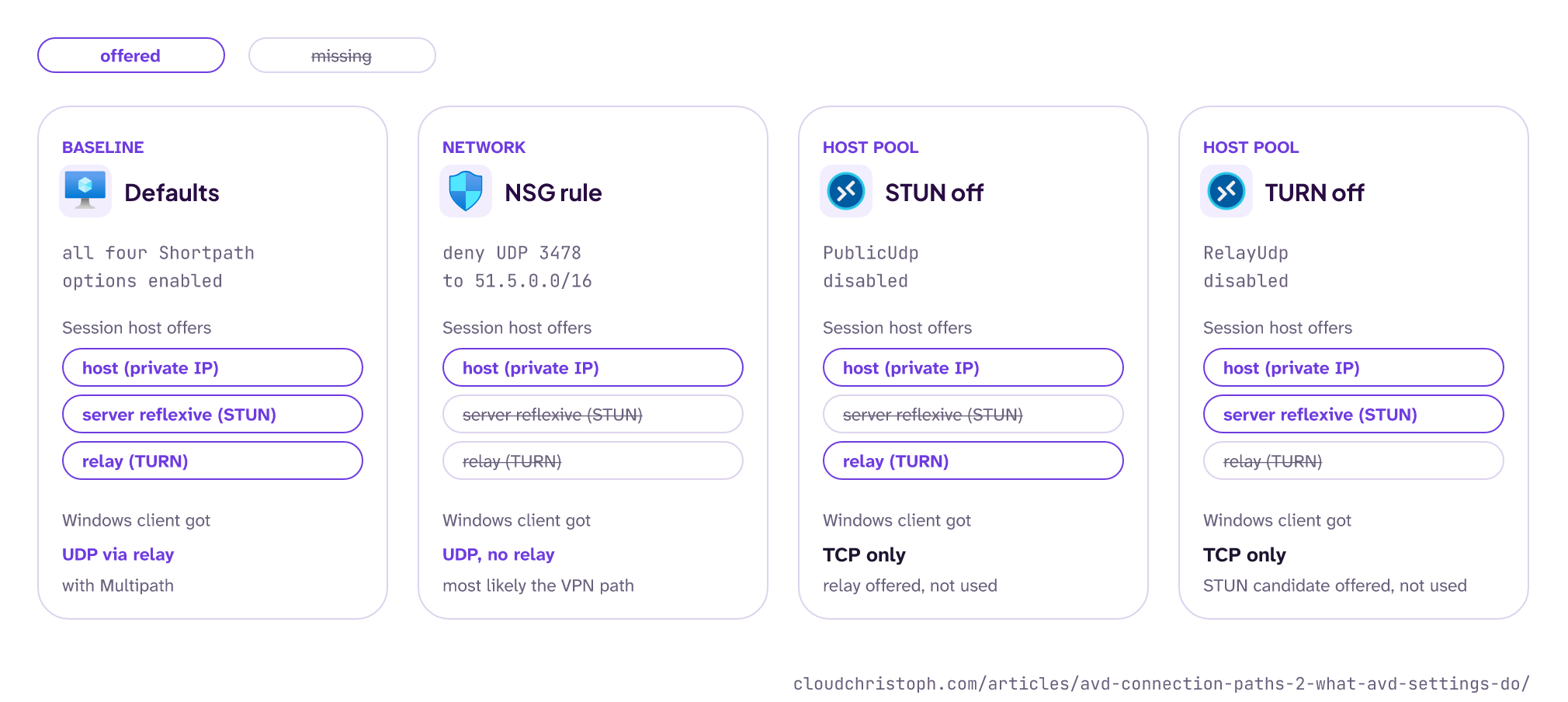
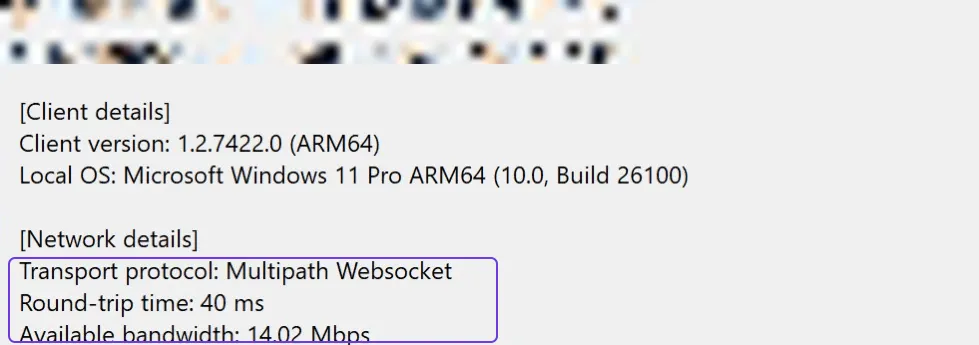
The switches worked as documented on the session host side. I checked the candidate lists in the logs: with STUN off there was no server reflexive candidate, with TURN off no relay candidate. But in both cases the Windows client did not use what was left. Not the relay alone, not the direct candidate alone. It stayed on TCP, even after more than a minute.
I can’t see from the session host side why the client behaves like that. My guess: it is the client’s pairing logic, which does not show up in any log I have access to. What I can say: these switches do not steer the path. Microsoft recommends keeping TURN enabled unless you are troubleshooting, because disabling it can push sessions onto TCP (configure RDP Shortpath). In my lab it happened every time.
My recommendation: leave all four on default. Use the switches for troubleshooting, one at a time, and switch them back afterwards.
The managed-network listener
The listener mode is the one setting that is off by default, and it is the only one that needs an inbound rule. You enable it with the policy Enable RDP Shortpath for managed networks. It listens on UDP 3390 (configurable), and the port has to be allowed inbound in the session host’s Windows Firewall and in the NSG. The client needs a direct route to the session host’s private address (configure RDP Shortpath).
Only sessions over the listener show up as UDP (Private Network) in the client. It also gives you a fixed port, which makes QoS easier: Microsoft documents a New-NetQosPolicy example that sets DSCP 46 on traffic from UDP 3390 (QoS for Azure Virtual Desktop).
The listener is a deliberate opt-in, so this part sticks to the defaults. If your users reach Azure on a private path, the listener is worth it: in my lab it got UDP in every session where ICE over the VPN was luck. Part 4 has the measurements and the rules it needs.
Transport settings on the session host
Two more settings can turn off UDP on the session host without anyone noticing:
- The policy Select RDP transport protocols must be unset or set to “Use both UDP and TCP”. “Use only TCP” disables UDP for every session (configure RDP Shortpath). Like the client-side policy from part 1, it’s often a leftover from old disconnect workarounds. Turning off UDP on the client was the workaround for a Remote Desktop bug in Windows 11 in 2022, and in a recent project I still found it active.
- The ICE port range for STUN and TURN defaults to 49152-65535; port 65330 is excluded because Azure reserves it (RDP Shortpath). You can move it to a smaller pool between 1024 and 49151; the policy defaults to base port 38300 with a pool of 1000 ports (configure RDP Shortpath). That is useful when your firewall team wants a predictable source range for the outbound UDP rule from part 3.
The AVD agent and network changes
The session host is the endpoint of RDP and also runs the AVD agent, which keeps the host registered and reports its health. And the agent has trouble when the session host’s egress changes.
In my lab, every egress change (Azure Firewall, NAT gateway, public IP, bypass route) left the session host unable to take connections for several minutes, although it reported itself as available. A restart brought the connections back. Part 3 has the timeline and my interpretation. The practical takeaway: restart the session host after any change to its egress. Put it in the change plan, or do it in a maintenance window with drain mode.
Two related checks:
- The Azure Virtual Desktop Agent URL Tool (
WVDAgentUrlTool.exein the RDAgent folder) checks the required endpoints from the session host, except the wildcard entries, which you have to verify yourself. Run it after any network change. - The Application event log shows agent problems with the gateway: event 3703 means the RD Gateway URL is not reachable, 3019 means the WebSocket transport URLs are not reachable (troubleshoot the agent).
And don’t trust the session host’s lastHeartBeat as a readiness check after such a change (part 6 explains why).
What the session host logs
On the session host, the event log Microsoft-Windows-RemoteDesktopServices-RdpCoreCDV/Operational tells you which transport each tunnel ended up on. Event 135 reports “the multi-transport connection finished for tunnel: 1, its transport type set to UDP” when the session moved to UDP (configure RDP Shortpath).
In my lab the sequence looked like this: event 130 about three seconds after the connect (the server starts multi-transport), event 135 for TCP right after, and event 135 for UDP once the UDP path was up. With the macOS client that took about 30 seconds; when the client did not offer UDP at all, there was no event 135 for UDP, just nothing. Handy for a quick check on a single session, but for anything beyond that, Log Analytics is the better place (part 6).
How to check
- Host pool: all four Shortpath properties on default or enabled.
- Session host policy: the RDP Shortpath switches not disabled, “Select RDP transport protocols” unset or both.
- Listener: only if you want it, then UDP 3390 inbound in Windows Firewall and NSG.
- ICE port range: default, or a narrowed pool that matches your outbound firewall rule.
- After any egress change: restart the session host, run the Agent URL Tool.
- Single session: RdpCoreCDV event 135 on the session host.
Conclusion
The host pool and session host switches work as documented, but they don’t let you pick the path: turning off STUN or TURN alone left my Windows client on TCP. Keep the defaults, treat the listener as a deliberate decision, and plan a restart whenever the session host’s egress changes.
So: hands off the defaults (unless you are troubleshooting). 😉
Part 3 is the big one: the network, with the firewall rules AVD needs and what Azure Firewall, NAT gateway, and the bypass route do to the UDP path.
Was this useful?
Noted. The next part is in the works. Get it by mail ↓

Comments