
Part 3 ended on the public side: STUN, TURN, firewalls, and NAT. The customer who started this series in part 1 needs more than that. Some of their users sit in the office, some connect through a VPN to headquarters, and external staff come in from anywhere.
The externals are the public case from part 3. The office and VPN users have a private path into Azure, which Microsoft lists as a “managed network” for RDP Shortpath. So UDP should just work there, right?
I measured it, with a full tunnel, a split tunnel, and TURN blocked at the internet breakout. Without any extra configuration, UDP over the VPN was luck: the same client got UDP once and stayed on TCP a few minutes later. Then I enabled the RDP Shortpath listener on UDP 3390, and 11 of 11 sessions ran on UDP, full or split tunnel, even with TURN blocked.
This part covers every private path: site-to-site VPN, a client VPN and ExpressRoute private peering. If you don’t have one, you can skip ahead to part 5.
What counts as a private network here?
Microsoft calls it a managed network in the AVD docs and a private network in Windows 365 and in the client dialog. Both mean the same thing: the client can reach the session host’s private IP address directly, without being blocked by a firewall or an NSG. The docs name two ways to get there: ExpressRoute private peering, and site-to-site or point-to-site VPN (RDP Shortpath).
Here are the usual private paths, with the addresses from my lab:
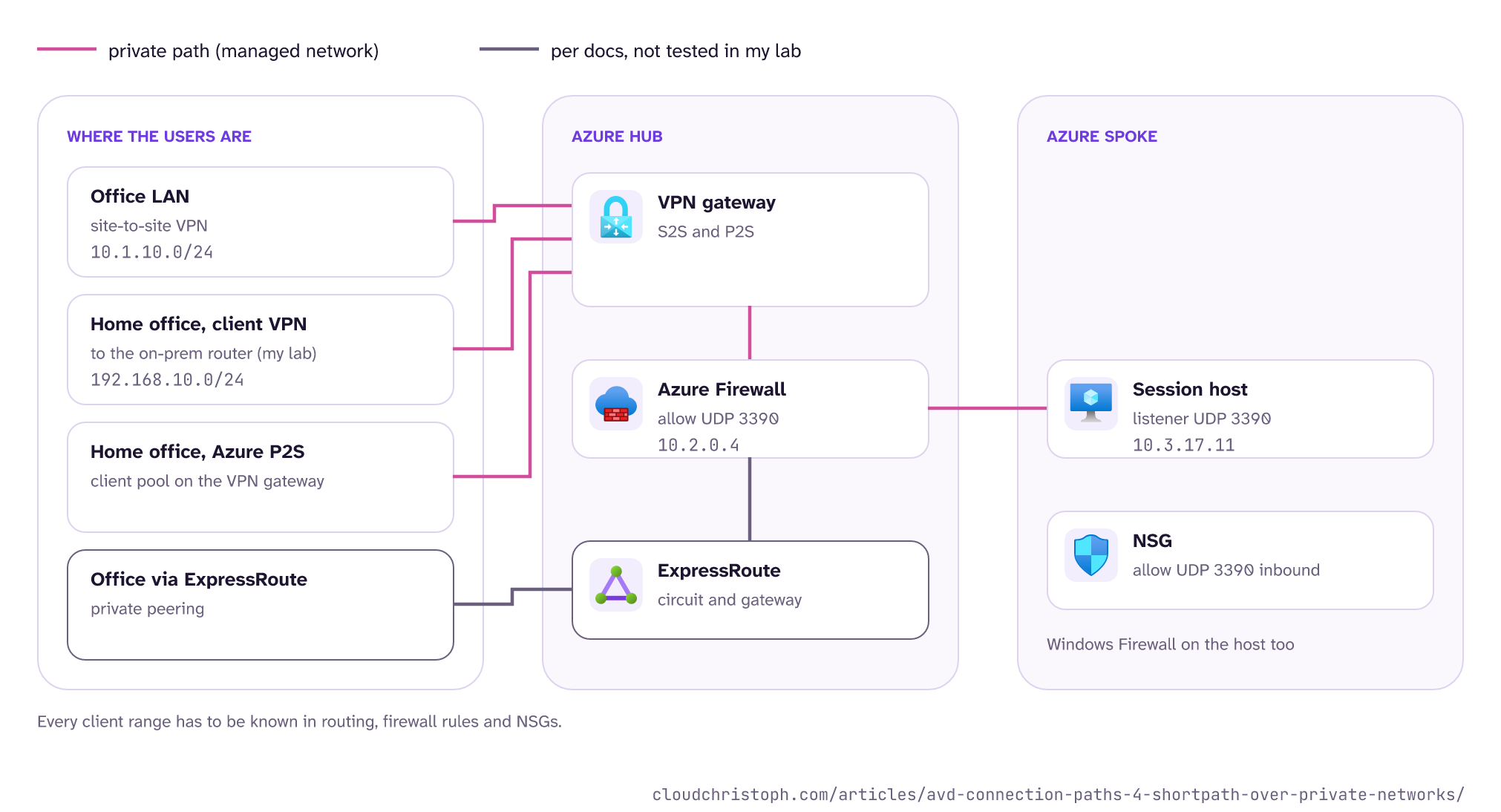
My lab covers the first two rows. The on-prem router has a site-to-site VPN into the hub, and on top of that a WireGuard client VPN for devices outside the on-prem network (pool 192.168.10.0/24). Clients on the on-prem LAN (10.1.10.0/24) are the “office over site-to-site” case; the client VPN users are the “home office” case. ExpressRoute gets its own section, clearly marked as docs, not lab.
Why does UDP over my VPN work only sometimes?
I measured all of this over several lab rounds in Germany West Central, with the lab from part 3: session host 10.3.17.11 in a spoke, Azure Firewall 10.2.0.4 in the hub, all four RDP Shortpath options on the host pool enabled, no listener. Clients were Windows App for macOS 11.4.3 and Windows App for Windows 2.0.1484. For the TURN tests I blocked UDP 3478 to 51.5.0.0/16 on my router, the way a strict internet breakout would.
Without the listener, a session can only get onto the private path through ICE: both sides offer their candidates, including the private addresses, and test pairs (part 1 has the basics). Microsoft calls this “RDP Shortpath for managed networks with ICE/STUN” (configure RDP Shortpath). Here is what I got:
| Setup (no listener) | Mac: sessions on UDP | Windows: sessions on UDP |
|---|---|---|
| On-prem LAN, site-to-site only | 1 of 6 | 0 of 6 |
| Client VPN, split tunnel | 2 of 3 | 0 of 3 |
| Client VPN, full tunnel | 1 of 3 | 0 of 3 |
| Client VPN, full tunnel, TURN blocked | 0 of 3 | 1 of 2 |
(Two more Windows runs in full tunnel got UDP after a rule change on my router, most likely through the relay.) On the day before, the same Windows client got UDP through the relay in two of three runs and sent its checks over the VPN every time (part 3). Same client version, same lab. That is what “not deterministic” looks like in numbers.
What happened inside the sessions that stayed on TCP tells more than the numbers.
The host checks, the client doesn’t
In every session that stayed on TCP, the Azure Firewall log showed the same picture. The session host sent ICE checks to every candidate the client had offered (tunnel address, LAN address, public address, relay). The client never sent a single check to the session host. The client capture agreed: it collected its candidates, reserved a relay, and then sent nothing.
In every session that got UDP, the first check came from the client. From there it went fast: in one split-tunnel run the Mac sent its first check through the tunnel to 10.3.17.11 and had an answer in under a second, and the session ran on the private path at 27 ms.
So why don’t the host’s checks work on their own? In my lab, unsolicited UDP from the session host never made it back to the clients. The firewall allowed it, but the VPN gateway never saw it (packet capture on the gateway, egress counters at zero), even with the firewall bypassed.
ICMP from the host arrived fine, and so did replies to traffic the client had started. I don’t have a root cause for this yet, so treat it as an observation from one lab. But the consequence holds anywhere the return path is stateful: if the client doesn’t send first, the private path doesn’t come up. Here is the difference, without and with the listener:
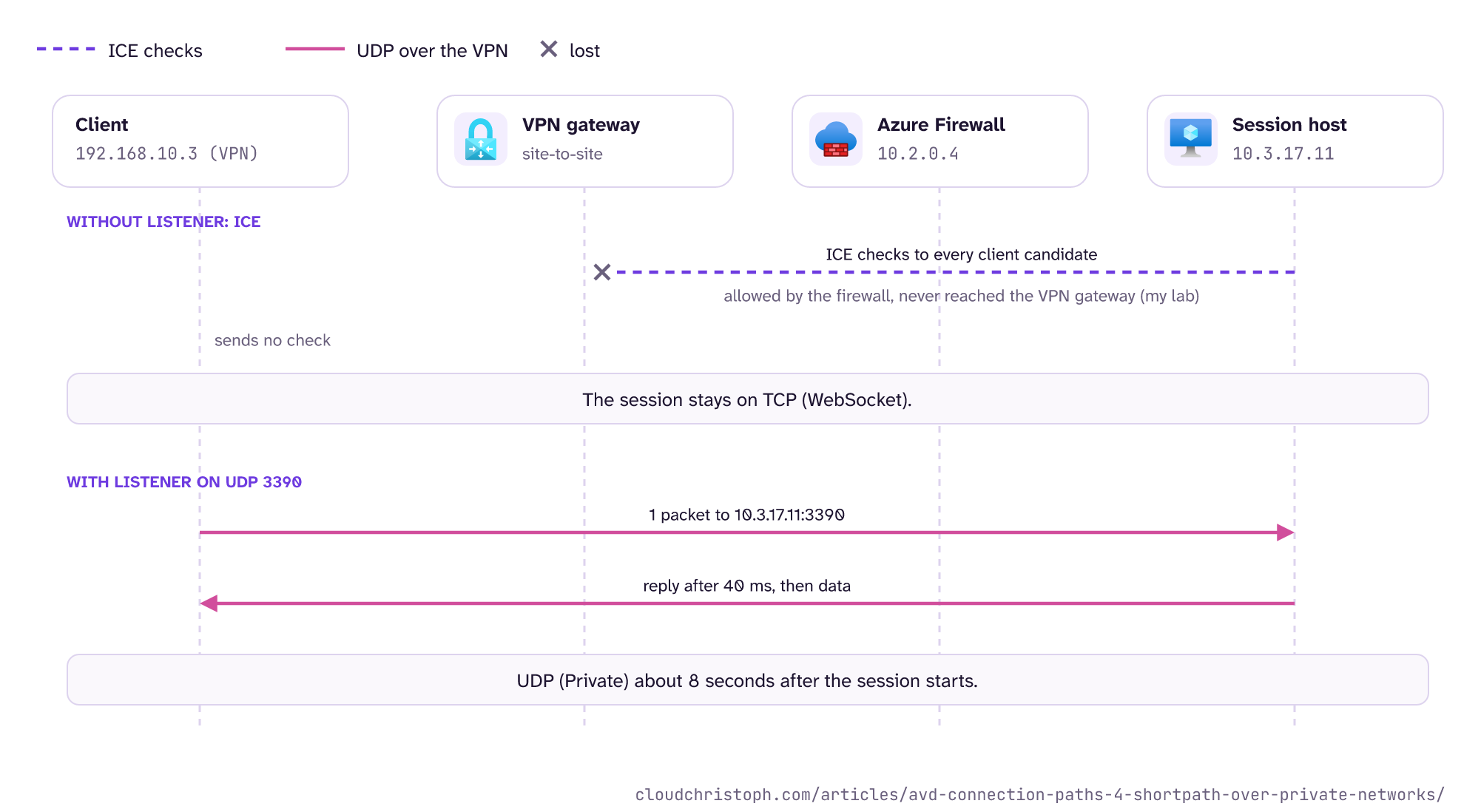
Whether the client sends its checks is decided somewhere inside the client. I saw it on Mac and Windows, with and without VPN, and I could not find a setting or network condition that predicts it.
Split tunnel: the 24-second wait
The split tunnel on the Mac added a delay on top. My VPN client put a scoped default route on the tunnel interface, so Windows App on the Mac also tried to reach the TURN relays through the tunnel. Those requests never got an answer.
The client tried eight times with backoff, and ICE only moved on to the checks after about 24 seconds. A TURN block at the breakout costs exactly the same 24 seconds, because the client waits for an answer that never comes.
Your VPN pool is not your on-prem range
One more thing that cost me an hour before the first test run. The client VPN on my router has its own address pool, and I had enabled the wrong one in Azure (the one I don’t use, of course). The symptom was a plain timeout:
$ nc -vz -w 5 10.3.17.11 3389
10.3.17.11 3389 (ms-wbt-server): Operation timed out
And, more confusing, no entries at all in the firewall log. The packets reached the session host fine, but Azure didn’t know the pool, so the replies went to the default route and out to the internet.
After adding 192.168.10.0/24 to the local network gateway, the firewall’s IP group, and the NSG, it worked. If your users come in through a client VPN that terminates on-prem, that pool is a network of its own and needs the same treatment as your office ranges (routing, firewall rules, NSGs). Check your config carefully, or let well-configured BGP at least take care of the routing part 😉
What changes with the listener?
The listener turns the process around. With RDP Shortpath for managed networks, the session host listens on UDP 3390 and sends its IP addresses to the client over the existing TCP connection. The client then connects to one of them directly, and when it works, the session moves to UDP (RDP Shortpath). There is no ICE involved, and the client sends first by design.
| Setup (listener on UDP 3390) | Mac: sessions on UDP | Windows: sessions on UDP |
|---|---|---|
| Client VPN, full tunnel, TURN blocked | 3 of 3 | 3 of 3 |
| Client VPN, split tunnel, TURN open | 3 of 3 | 2 of 2 |
Same lab, same afternoon. Here is the full-tunnel case with TURN blocked, once without and once with the listener:
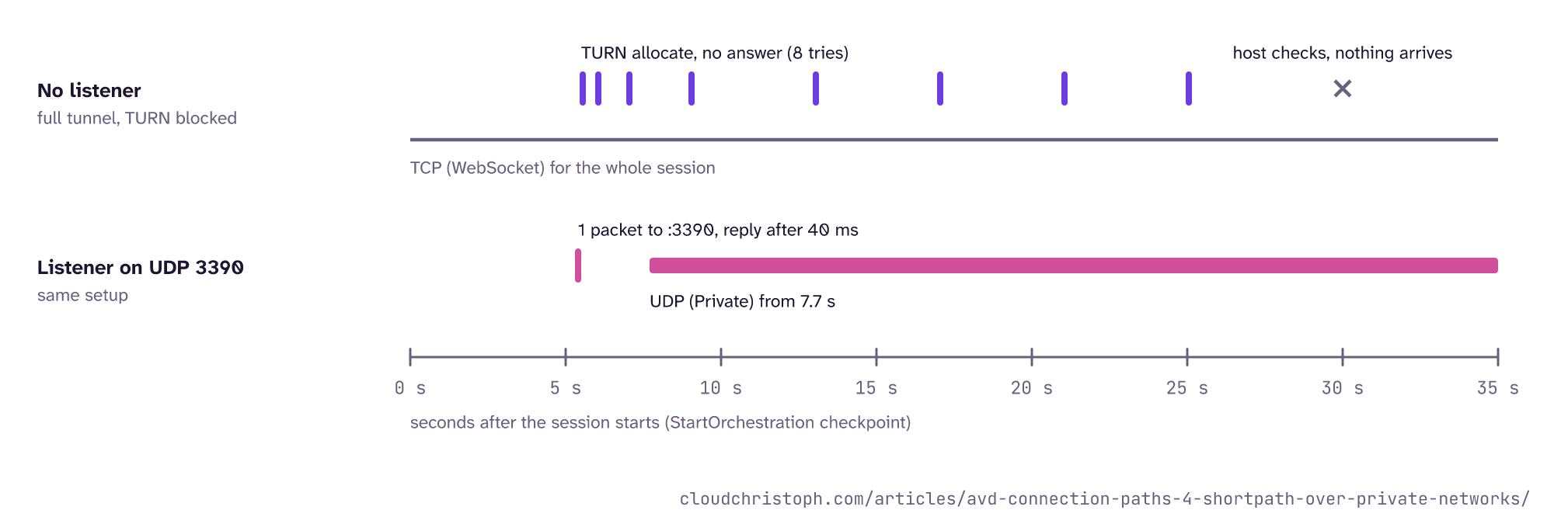
In both sessions the Mac sent its first UDP packet about 5 seconds after the session started. With the listener, that packet went from the tunnel address to 10.3.17.11:3390, the host answered within 40 ms, and 8 seconds after the start the session ran on UDP, before the logon had even finished. With the listener reachable, the Mac didn’t bother with ICE anymore. In the split-tunnel runs it didn’t send a single STUN or TURN packet, although TURN was open. The dialog on the Mac, from two sessions that afternoon:

My recommendation: if your users reach the session hosts on a private path, enable the listener. It is the one RDP Shortpath mode where the client doesn’t depend on the session host’s checks getting through, and it gives you a fixed port for firewall rules and QoS (part 2 has the QoS example).
What do I have to open?
This is the part firewall teams won’t expect from AVD: the listener needs an inbound rule. It’s the one exception to the “no inbound port” rule from part 3, and a logical one: with the listener, the client doesn’t meet the host through a gateway or a relay. It sends UDP straight to the host’s private address. No gateway, no relay in between, so the host has to … well … listen. The docs are explicit that every firewall in the path has to allow the port inbound to the session hosts, “including the Windows Firewall”, and that an NSG must not block it (configure RDP Shortpath).
Here is the full list:
- Host pool: the RDP Shortpath setting for managed networks must not be disabled. The most restrictive setting wins (part 2).
- Session host policy: enable Enable RDP Shortpath for managed networks (Group Policy or Intune, under Windows Components, Remote Desktop Services, Remote Desktop Session Host, Azure Virtual Desktop). Port 3390 is the default.
- Restart the session hosts. The listener only starts after a restart.
- Windows Firewall on the session host: UDP 3390 inbound.
- NSG on the session host subnet or NIC: UDP 3390 inbound from your client ranges.
- Azure Firewall or NVA in the hub: if client traffic passes it, allow UDP 3390 from the client ranges to the session hosts. Azure Firewall doesn’t SNAT network-rule traffic to private ranges by default (SNAT private ranges), so the session host sees the real client address. Keep it that way.
- On-prem firewalls and the VPN concentrator: UDP 3390 from the clients toward the session host subnet.
- Routing: every client range (offices, VPN pools) known on the Azure side, so the replies go back through the tunnel.
The official way is the policy, through Intune or Group Policy. My lab host isn’t managed by either, so I took a shortcut: I wrote the two registry values directly with az vm run-command, plus the Windows Firewall rule.
$k = 'HKLM:\SOFTWARE\Policies\Microsoft\Windows NT\Terminal Services'
New-ItemProperty -Path $k -Name fUseUdpPortRedirector -PropertyType DWord -Value 1 -Force
New-ItemProperty -Path $k -Name UdpPortNumber -PropertyType DWord -Value 3390 -Force

New-NetFirewallRule -Name 'RDPShortpath-Managed-UDP3390' -DisplayName 'RDP Shortpath (managed networks)' `
  -Direction Inbound -Protocol UDP -LocalPort 3390 `
  -RemoteAddress 10.1.10.0/24, 192.168.10.0/24 -Action Allow

Restart-Computer
After the restart, Get-NetUDPEndpoint -LocalPort 3390 showed the listener on 0.0.0.0 and ::.
The same commands are in the lab repository as Set-ShortpathListener.ps1.
The source restriction in the firewall rule is my own hardening; the docs only say “allow the port inbound”. I would still limit it to the ranges that actually have a private path: nobody on the internet has a reason to open a connection to port 3390 on your session hosts.
And the NSG rule, with the same ranges:
az network nsg rule create -g <resource-group> --nsg-name <nsg> -n allow-rdp-shortpath-managed \
  --priority 200 --direction Inbound --access Allow --protocol Udp \
  --source-address-prefixes 10.1.10.0/24 192.168.10.0/24 --destination-port-ranges 3390
Does this work over ExpressRoute?
According to the docs, yes. ExpressRoute private peering is the first example Microsoft gives for a managed network, before VPN (RDP Shortpath). One limit up front: I did not test ExpressRoute in my lab (no ExpressRoute option at my location, sadly). Everything in this section comes from the docs and from how the mechanism works.
What carries over, because it doesn’t depend on the transport:
-
The listener mechanism works on any path with line of sight.
The client sends to
host:3390, no ICE, no STUN or TURN. -
The rules are the same.
Windows Firewall, NSG, Azure Firewall or NVA in the hub, and the on-prem firewalls toward Azure all need UDP 3390 inbound to the session hosts.
-
Every client range must be known.
Office ranges, branch ranges, and any VPN pool that reaches Azure over the ExpressRoute circuit have to show up in BGP, firewall rules, and NSGs.
What I would not assume without testing:
-
Sessions without the listener get UDP.
ICE over the circuit depends on the client sending its checks, just like over VPN. I haven’t measured how often that happens over ExpressRoute.
-
Unsolicited UDP finds its way back.
What I saw in my lab involved a VPN gateway. An ExpressRoute gateway is a different product, and I have no data on it.
-
The private path wins against a local breakout.
In my projects, offices on ExpressRoute often have their own internet breakout. Then the public path (STUN, TURN) competes with the private one, and first-found decides. With the listener, I would expect the private path to win, as it did in my split-tunnel runs, and Microsoft expects the same (scenario 4). Check it in the logs.
How do I know it’s really UDP?
Don’t trust the dialog on this one. The Mac showed UDP (Private) with the listener (the docs call it UDP (Private Network)), and UDP or UDP (Local Direct) for the same private path over ICE.
Windows App 2.0.1484 showed Multipath Websocket in all three listener sessions with TURN blocked, while the session host ran them over UDP. With TURN open, the same path showed up as UDP - Multipath. My guess: the Windows dialog labels the path by what else is available, but I haven’t confirmed that.
The session host knows better: in Log Analytics, a listener session has a ShortpathRequested checkpoint with udpPort 3390, followed by ShortpathEstablished with initialUdpType set to ShortpathPrivate. ICE over the private path shows up as Shortpath_Direct_UDP, the same value as a direct public path. While a session runs, the RemoteFX Network counters on the session host show which transport carries the data. Part 6 has the queries, the results from these runs, and a query that sorts every session by path. The counter script (Get-RemoteFxCounters.ps1) and the queries for the checkpoints (session-checkpoints.kql) and for who sends the first check (firewall-who-checks-whom.kql) are in the lab repository.
Conclusion
A private path into Azure doesn’t give you UDP by itself. Without the listener, it depends on the client sending its checks first, and in my lab that was unpredictable on both Mac and Windows. With the listener on UDP 3390, the client connects on its own, and I got UDP in every session, full or split tunnel, TURN blocked or not. The price is an inbound rule, in every firewall between the client and the session host.
If your users are on VPN or ExpressRoute, I would enable the listener and check the result in the logs. And if your firewall team raises an eyebrow at an inbound rule for AVD, the two result tables in this part are a good start for that conversation.
In part 5 we leave UDP behind and look at the rules that decide whether a user can sign in at all.
Was this useful?
Noted. The next part is in the works. Get it by mail ↓

Comments