
Every Azure Virtual Desktop (AVD) project I have been part of had the same moment: the firewall team asks for “the list”. Which ports, which addresses, inbound or outbound? For the control plane the answer is a long list, for inbound almost nothing. UDP is the hard part.
This is part 3 of a series about how an AVD session finds its way from the client to the session host. Part 1 looks at the clients, part 2 at the host pool and session host settings. This part is about the network, because this is where most of my assumptions turned out to be wrong. Fair warning: it is the longest part of the series. The network rules for sign-in and profiles (domain controllers, hybrid join, FSLogix) have their own part 5.
The lab
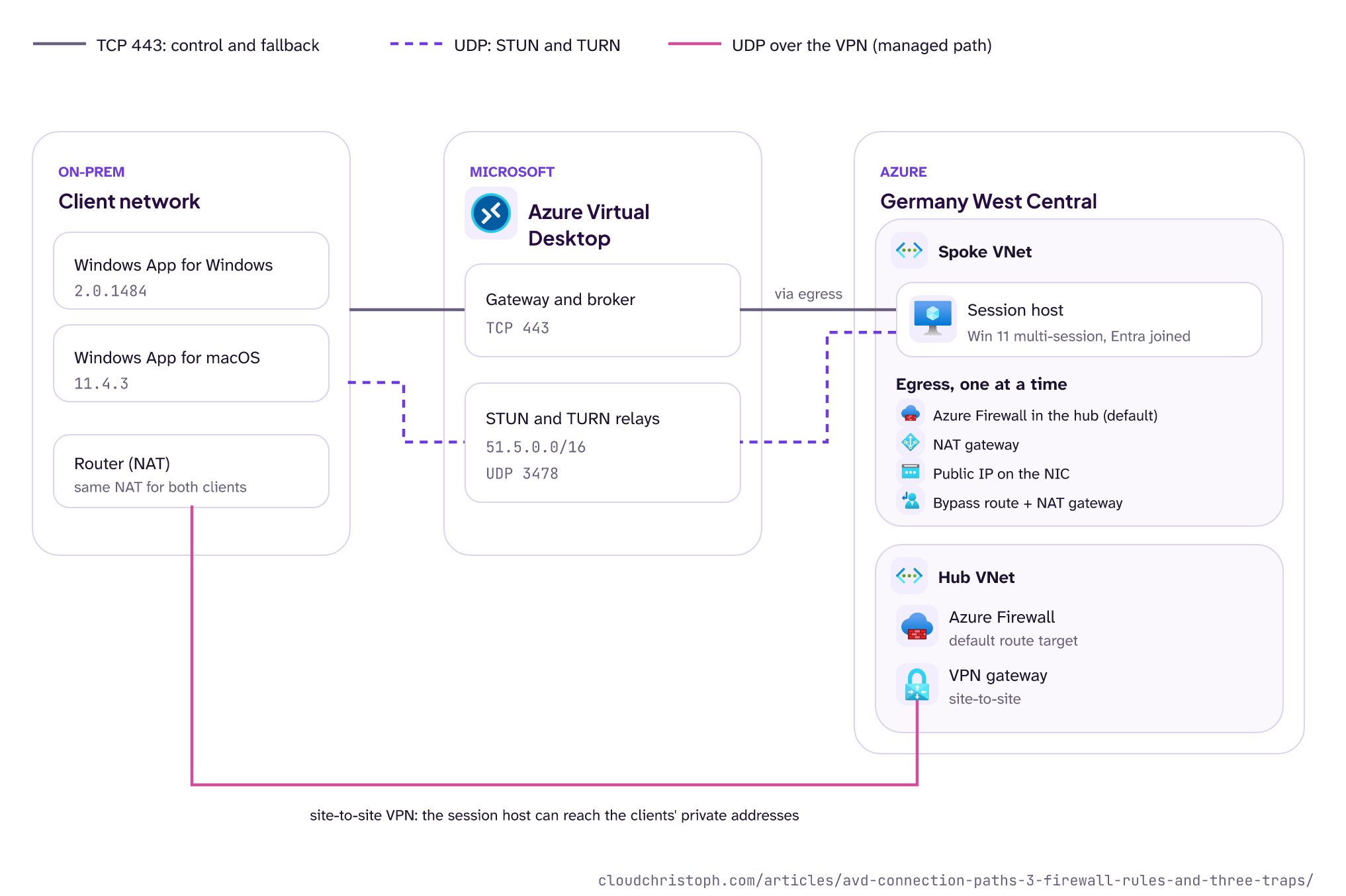
Everything below was measured in my lab over several rounds, and every number, port and range from Microsoft is linked to the page it comes from. Here is the setup:
- Session host: Windows 11 Enterprise multi-session 24H2, Entra joined, in a spoke VNet. Default route
0.0.0.0/0to an Azure Firewall Premium in the hub. - Host pool: pooled, all four RDP Shortpath options enabled (the default), no managed-network listener.
- On-prem: a site-to-site VPN from my on-premises network (one NAT router) into the hub.
- Clients: Windows App for Windows 2.0.1484 and Windows App for macOS 11.4.3, both on the same client network behind the same NAT.
Between connects I switched the host’s egress: Azure Firewall, NAT gateway, a public IP directly on the NIC, and the firewall bypass route that Microsoft recommends for AVD.
The Terraform code for these variants and the queries behind the log results are in the lab repository.
Two planes: TCP for control, UDP for speed
An AVD connection always starts on TCP. Client and session host both connect outbound to the AVD gateway on TCP 443, and the gateway connects the two. Microsoft calls this reverse connect: the session host never listens for incoming RDP, which is why AVD works without a single inbound rule on the session host (and why “open 3389” is never the answer). Only after that does RDP try to move the session onto a UDP path, RDP Shortpath.
Which gateway that is, you don’t get to choose. My session host runs in Germany West Central and the host pool’s metadata sits in West Europe, yet WVDConnections shows germanynorth as GatewayRegion for 74 of my 78 sessions, and germanywestcentral only for two. That is by design: Azure Front Door picks the gateway with the lowest latency for the user’s device, and the gateway lets session hosts sit in any region. So don’t assume the TCP leg ends in the region where your session hosts run, and don’t build IP-based rules or latency expectations on that assumption. The FQDN tag and service tags below don’t care either way.
There are two different rule sets. The TCP one has to work, or nobody connects at all. The UDP one is optional in the sense that sessions fall back to TCP, but without it users get a slower and less stable desktop, especially on poor networks (RDP Shortpath).
What always has to work: TCP 443 and friends
The session host needs outbound access to a list of FQDNs. The full, current list is on the required FQDNs and endpoints page. The ones you will meet in every firewall log:
| Destination | Port | What for | Tag |
|---|---|---|---|
*.wvd.microsoft.com |
TCP 443 | Service traffic, including the TCP RDP session | WindowsVirtualDesktop |
*.service.windows.cloud.microsoft |
TCP 443 | Service traffic | WindowsVirtualDesktop |
login.microsoftonline.com |
TCP 443 | Sign-in | AzureActiveDirectory |
*.prod.warm.ingest.monitor.core.windows.net, gcs.prod.monitoring.core.windows.net |
TCP 443 | Agent traffic and diagnostics | AzureMonitor |
mrsglobalsteus2prod.blob.core.windows.net |
TCP 443 | Agent and SxS stack updates | Storage |
azkms.core.windows.net |
TCP 1688 | Windows activation | Internet |
*.windows.cloud.microsoft, *.windows.static.microsoft |
TCP 443 | Service traffic | - |
Certificate endpoints (oneocsp.microsoft.com, ctldl.windowsupdate.com and others) |
TCP 80 | Revocation and certificate trust | AzureFrontDoor.FirstParty for oneocsp, otherwise - |
Two entries on that page are easy to overlook because they are not FQDNs: 169.254.169.254 (Instance Metadata Service) and 168.63.129.16 (the Azure platform IP). Microsoft is explicit that traffic to them must not be intercepted, proxied, or redirected. If you push everything through an inspecting proxy, make sure these two are excluded.
My recommendation: don’t maintain this list by hand. On Azure Firewall, use the FQDN tag WindowsVirtualDesktop in an application rule, and service tags in network rules and NSGs. Both are groups that Microsoft maintains (host names for the FQDN tag, IP prefixes for service tags), so you don’t copy lists that change without notice.
That is what Microsoft recommends on the required FQDNs page, and the Azure Firewall guidance for AVD builds on the FQDN tag. The relay range 51.5.0.0/16 from the UDP section is part of the service tag WindowsVirtualDesktop (checked against the API data in October 2026), so the tag covers UDP 3478 as well, and a UDR on it sends the relay traffic past the firewall too.
The tag covers the TCP side, too: in three days of firewall logs in my lab, every connection of the session host to the AVD service on TCP 443 went to an address inside the tag, and nothing needed the FQDN rules for *.wvd.microsoft.com. I did not check the client side, which has no firewall in my lab. Then check the result from the session host with the Agent URL Tool from part 2.
Don’t forget the other end. Clients behind a corporate proxy or firewall need their own list, which is also on the required FQDNs page under end user devices: the same service FQDNs, login.microsoftonline.com, graph.microsoft.com, and UDP 3478 to 51.5.0.0/16. More on that last one in the UDP section.
UDP: where it gets interesting
RDP Shortpath can use three kinds of UDP path:
- Managed networks: a direct path over your VPN or ExpressRoute.
- Public networks with STUN: a direct path over the internet, through both NATs.
- Public networks with TURN: a relayed path through a Microsoft relay server in Azure.
The rules
The ranges are documented on the RDP Shortpath page under network configuration:
| From | To | Port | What for |
|---|---|---|---|
| Session host | 51.5.0.0/16 |
UDP 3478 | STUN and TURN |
| Session host | Any | UDP 1024-65535 | Direct STUN path to the client |
| Client | 51.5.0.0/16 |
UDP 3478 | STUN and TURN |
| Client | Public IPs of the NAT gateway or Azure Firewall (learned via STUN) | UDP 1024-65535 | Direct STUN path to the session host |
If you still have 20.202.0.0/16 in your rules: Microsoft announced the move of the relay infrastructure to 51.5.0.0/16 in September 2025 (global expansion of TURN relay), and the RDP Shortpath page now describes the transition as completed. The old range can go.
The second row is the one that makes security teams nervous. “UDP to any” is broad, but Microsoft recommends it explicitly, because the session host cannot know in advance where the client will be. If you don’t allow it, AVD still works, but you lose the direct STUN path and get relay at best. Whether that trade-off is fine depends on your clients. For the Windows client, as you’ll see below, it barely matters.
On the session host side, the ICE port range defaults to 49152-65535, and you can move it to a smaller, predictable range below 49152 (38300-39299 with the policy defaults, configure RDP Shortpath). That is a setting for part 2, but it is the lever if your firewall team wants a smaller source range.
Trap 1: a “TURN block” is also a STUN block
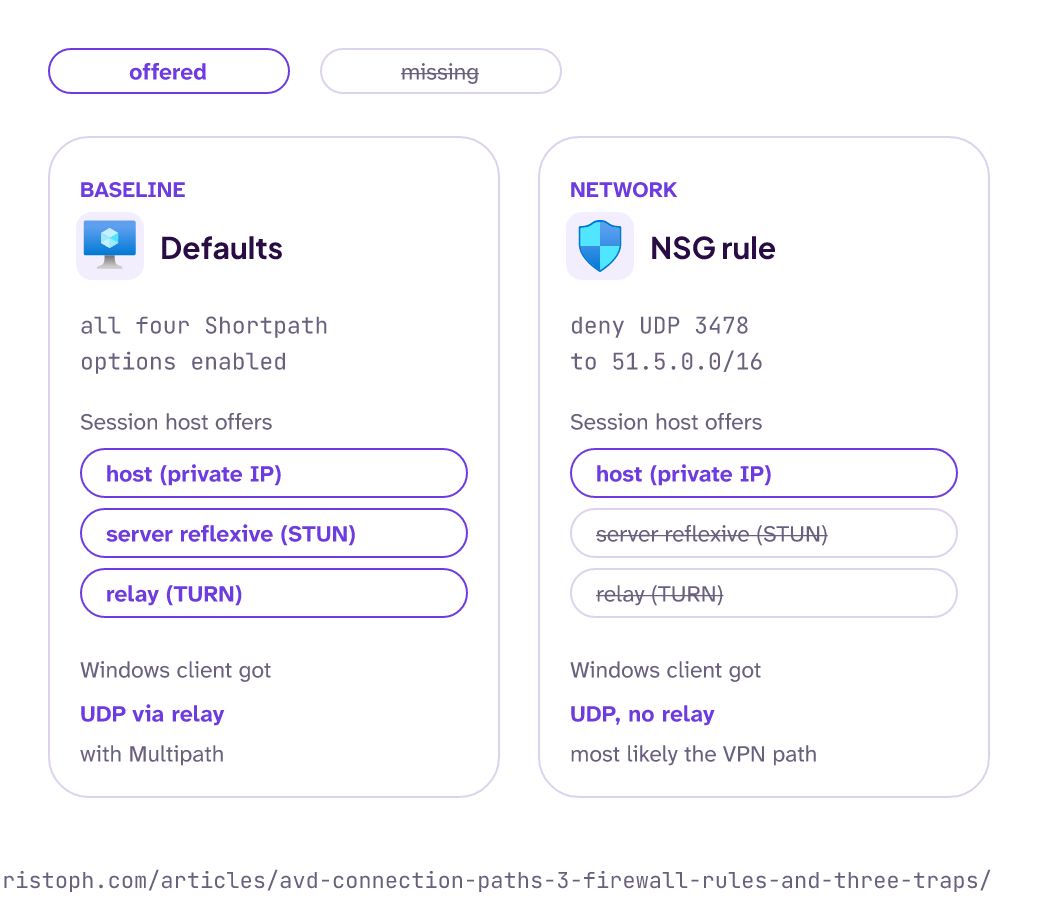
STUN and TURN share the same destination: UDP 3478 to 51.5.0.0/16. In one test I wanted to see what happens without the relay, so I denied exactly that in the NSG. The session host’s candidate list afterwards had no relay candidate, as planned, but also no server reflexive candidate. Blocking TURN on the network blocks STUN too. A firewall rule can’t tell them apart: with that range blocked, neither the Mac nor the Windows client got an answer to its STUN or TURN requests in my lab. What the block doesn’t stop is UDP over a private path with the listener: with the block in place, every session still got UDP (more in part 4).
The Windows client still got UDP in that test, without relay. The firewall logged the session host probing the client’s private address over the VPN, so most likely the session ended up on the managed path. I’ll come back to that path in the VPN section.
Compared with the defaults, the candidate list shows it:
Does Azure Firewall force TURN?
The docs suggest so. For symmetric NAT, which is what Azure Firewall and NAT gateway do, the RDP Shortpath page points you to a relayed connection with TURN. The Windows 365 guidance goes further and says symmetric NAT on either side prevents STUN. I expected exactly that, and the symmetric NAT part was right.
The session host’s candidates showed it clearly. The same local socket got two different public ports for two different STUN servers, which is the definition of symmetric NAT. The public ports came from two small port ranges (around 1024 and around 3520), reused across sessions. My interpretation: those are the two firewall instances behind the internal load balancer, each translating from its own small port range.
And yet the macOS client got a direct STUN path through that firewall in 6 of 8 sessions on my client network. My explanation: ICE needs only one of the two NATs to be friendly. The NAT router at my site accepted packets from the firewall’s public address on a port it had never sent to, the client learned that address on the fly, and the pair worked. Behind a stricter client NAT (carrier-grade NAT, a phone hotspot, the stricter corporate firewalls) that does not happen, and then the docs are right: TURN or nothing.
So in my lab, “symmetric NAT means TURN” held only for strict networks on the client side, which is more optimistic than the Windows 365 guidance. Treat it as a lab observation: it depends on the client’s NAT, not on the firewall alone.
Does the egress variant matter?
With the Windows client, I connected after every egress switch and read the transport from the Connection Information dialog after about a minute.
| Session host egress | Windows client got |
|---|---|
| Azure Firewall | UDP (Relay), Multipath |
| NAT gateway | UDP (Relay), Multipath |
| Public IP on the NIC (after a host restart) | UDP (Relay), Multipath |
| Azure Firewall plus bypass route and NAT gateway | UDP (Relay), Multipath |
The only variant that did not end in the relay was the one where I denied UDP 3478 in the NSG: UDP, Multipath, without relay (that is trap 1 above).
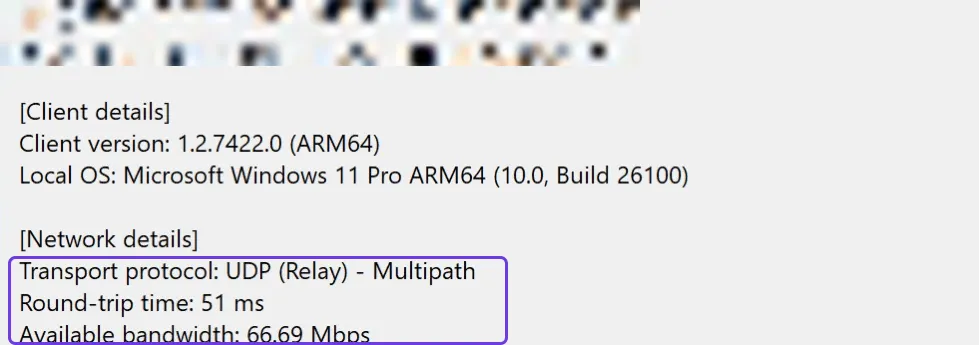
The Windows client took the relay every time TURN was reachable, no matter how the session host reached the internet. Even with a 1:1 public IP on the NIC, the best case for STUN, it chose the relay. That matches the Windows 365 description of RDP traffic: it calls direct STUN a best-effort method and tells you to prioritize relayed UDP via TURN. The AVD pages list STUN first in order of preference, so the two docs don’t quite agree.
The practical takeaway: you don’t need a NAT gateway or a public IP on your session hosts to get UDP. Relay through Azure Firewall works, and the latency difference in my lab was small (around 50 ms either way from my site to Germany West Central).
Trap 2: changing the egress breaks the AVD agent
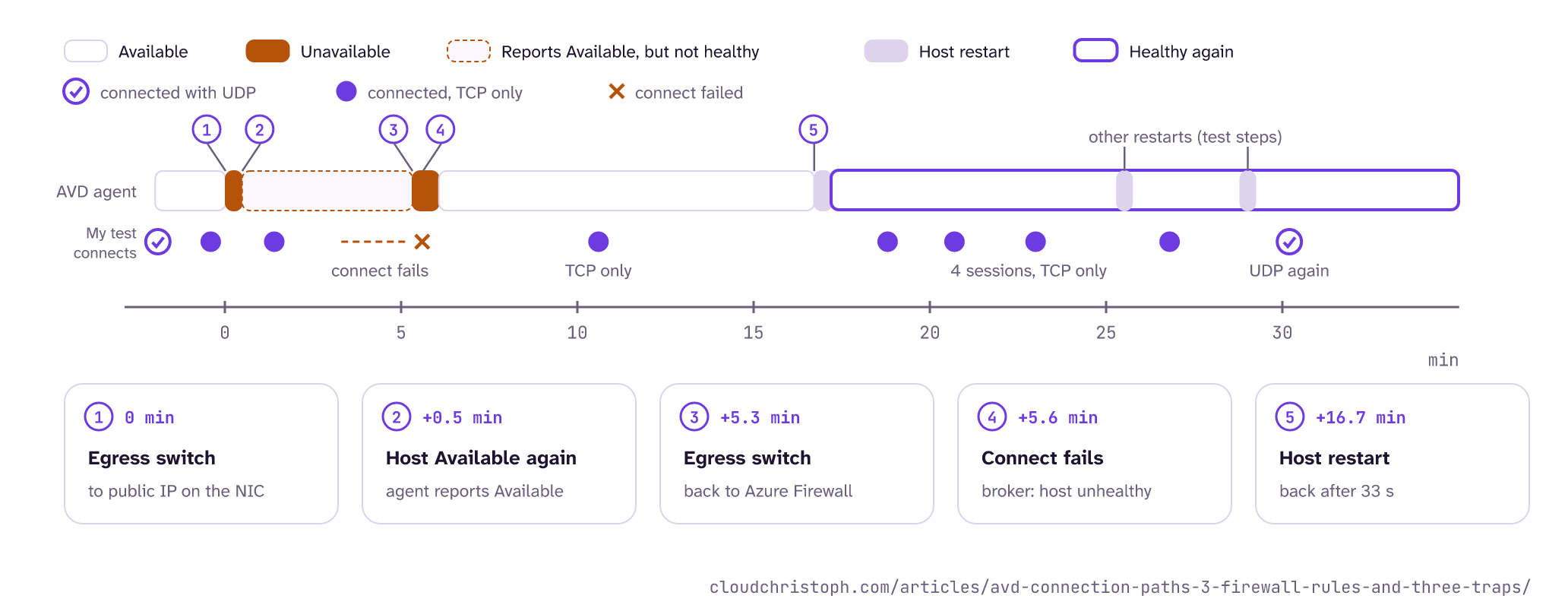
This one cost me an hour. After every egress switch, the session host dropped out. WVDAgentHealthStatus showed it as unavailable for a few seconds to a minute, then available again, but new connections failed with “connection attempt timed out” or “no available resources” for several minutes. The connections that did work got no UDP. In the logs the broker called the host unhealthy (ConnectionFailedUserHasValidSessionButRdshIsUnhealthy) while the agent reported Available.
My interpretation: the AVD agent keeps long-lived TCP connections. After the route change, their packets take a new path, and the new path has no state for them (Azure Firewall drops packets of connections it has never seen). The agent only recovers after its own timeouts.
The firewall log hints at the same mechanism outside my tests: in 24 hours it logged 52 denies with “Default Action” on the AVD gateway addresses, 51 of them on a source port that had been allowed before. The deny came at least five minutes after the last allow. The firewall seems to forget long-lived connections, probably through its TCP idle timeout (my guess, I haven’t checked the value), and in that log the denies pile up in exactly the window of the egress switch.
A restart of the session host brought the connections back: Available again after 33 seconds, and the next four sessions connected again, but all on TCP.
UDP returned about 30 minutes after the first switch, after two more restarts for other tests, so I can’t tell you how long UDP needs after a single restart. UDP is not deterministic anyway, as part 1 showed: the same setup can give UDP in one connect and TCP in the next.
Trap 3: the bypass route needs a way out
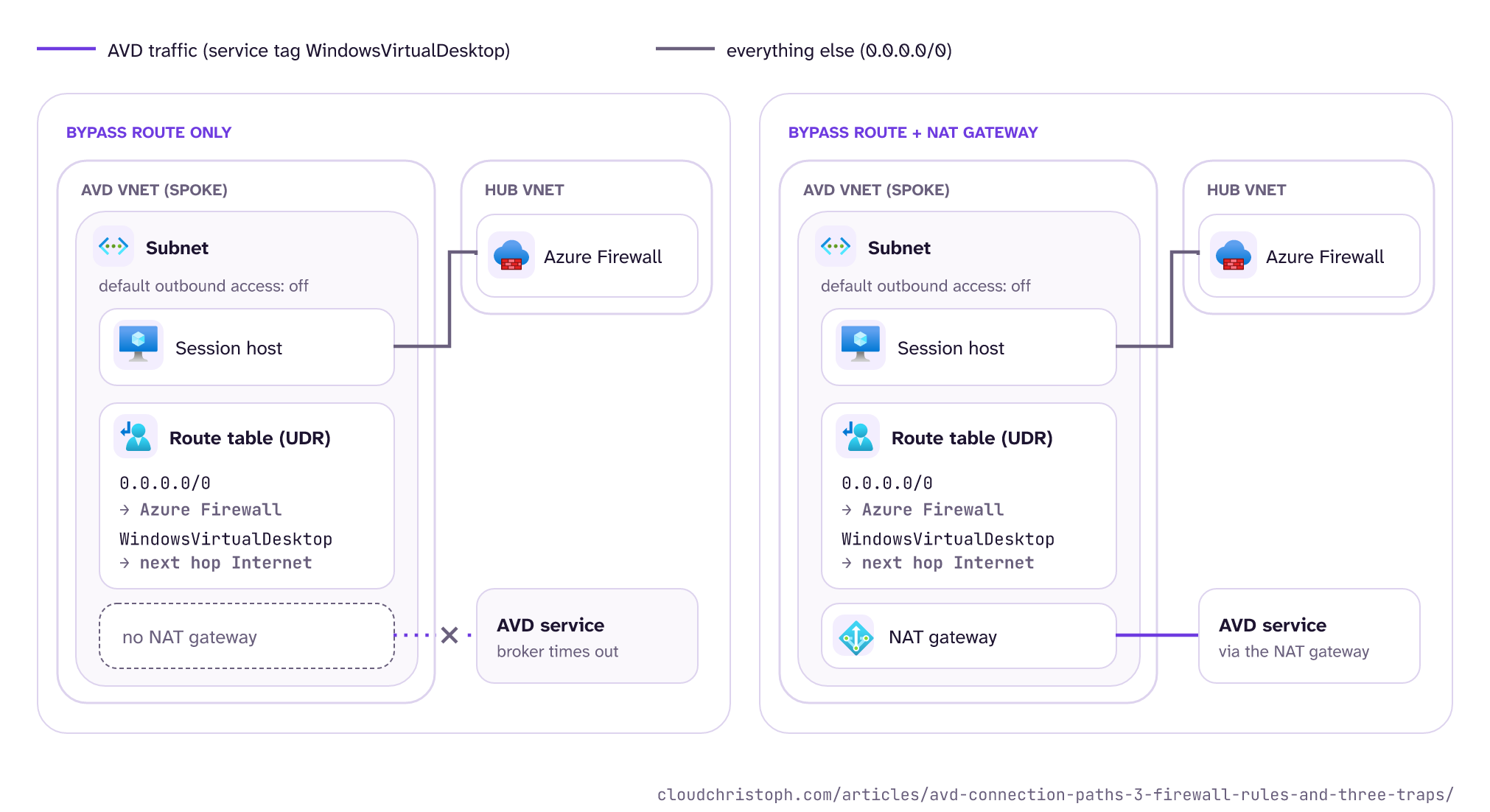
To avoid disconnects during Azure Firewall scale-ins, Microsoft recommends a user-defined route for the service tag WindowsVirtualDesktop with next hop Internet, so AVD traffic skips the firewall. But many of my customers don’t want any traffic to skip the firewall, even if it’s AVD and Microsoft recommends it (it’s complicated … 🙈).
On a subnet with default outbound access disabled, which is where new subnets are heading, that route alone does nothing useful. It expands to the AVD prefixes, but “next hop Internet” has no way out, and the connection to the broker simply times out. With a NAT gateway attached to the subnet as well, it works: AVD traffic leaves through the NAT gateway, everything else still takes the 0.0.0.0/0 route to the firewall, because a UDR wins over the NAT gateway. If you want to compare the outbound options (public IP, load balancer, NAT gateway), I did that in Outbound Internet Access for Azure VMs.
The managed path over VPN
If your users sit on-prem with a VPN or ExpressRoute into Azure, there is a private path as well. Without the listener, ICE simply includes the private addresses and picks the route with the lowest latency, and such a session shows up as plain UDP, not as UDP (Private Network). In my lab that worked only sometimes, and the listener on UDP 3390 fixed it. That story gets its own part 4.
What you don’t need for a default AVD setup
In my projects, firewall requests for AVD often contain a few rules “just in case”. For a default setup, none of these are needed:
-
Inbound TCP 3389 to the session hosts.
That is the classic from traditional Remote Desktop Services, where clients, the broker, and the gateway reach the session host on 3389. AVD needs no open inbound port at all, and Microsoft recommends against opening 3389 (prerequisites). Reverse connect has no TCP listener.
-
A public IP on the session host.
Microsoft recommends against it, and so do I. It did not change the result in my lab either; the Windows client used the relay anyway.
-
Inbound UDP for STUN or TURN.
Both start outbound from the session host; the replies come back through the existing state.
-
UDP 3390 and its Windows Firewall and NSG rules.
Only needed for the managed-network listener, which you enable deliberately (configure RDP Shortpath). Part 4 shows when it is worth it.
-
A NAT gateway just for UDP.
Relay works through Azure Firewall. A NAT gateway only makes sense if the traffic should leave the spoke VNet directly, like the bypass route in trap 3, and not for Shortpath.
-
20.202.0.0/16in your rules.Replaced by
51.5.0.0/16(global expansion of TURN relay).
How to check
-
From the session host:
- TCP: run
WVDAgentUrlTool.exe. - UDP:
avdnettest.exetests STUN, TURN, and the NAT type. The sample output on the configure RDP Shortpath page still shows the old20.202.xaddresses, so don’t be confused by that.
- TCP: run
-
From the client:
- Windows: the same
avdnettest.exe, run on the client network. - macOS and Linux: avd-shortpath-test, my unofficial counterpart. The Linux build is meant for the network at a thin client site: run it on any Linux laptop or a Raspberry Pi in that network.
- If it reports a symmetric NAT on the client side, expect relay.
- Windows: the same
-
In the firewall logs: filter network rule hits on UDP 3478 by a short time window around the connect. The session host talks to STUN and TURN servers constantly, even without sessions, so the unfiltered view is mostly noise. My terminal tool az-firewall-watch streams them live from an Event Hub, so you see the hits right when you connect.
-
Your firewall rules, if you maintain them by hand: a third-party network virtual appliance (NVA) that can’t read Azure service tags needs the prefixes as a list, and a list copied once goes stale, because the tag changes without notice. Compare your list with what
WindowsVirtualDesktopcontains today, including51.5.0.0/16for UDP 3478:bashaz network list-service-tags --location germanywestcentral \ --query "values[?name=='WindowsVirtualDesktop'].properties.addressPrefixes" -o tsvThere is only this one tag, no regional variants;
--locationonly picks which region’s API data you query. -
After any egress change: restart the session hosts before you test, or you will measure the agent recovering instead of the network.
Conclusion
For TCP, AVD needs a list, and the FQDN tag and service tags maintain it for you. For UDP, allow UDP 3478 to 51.5.0.0/16 from session hosts and clients, and if you want direct STUN paths, add UDP 1024-65535 outbound. Don’t expect Azure Firewall, NAT gateway, or a public IP to change much for the Windows client: it takes the relay anyway. The three traps: a block on 3478 stops STUN and TURN together, an egress change needs a host restart, and the bypass route needs a NAT gateway on private subnets.
If your firewall team asks for “the list” next time, you now have it (and a few reasons why it is shorter than they think).
If your users reach Azure on a private path (VPN or ExpressRoute), part 4 is for you: why UDP over a VPN was luck in my lab, and the listener that fixed it.
Was this useful?
Noted. The next part is in the works. Get it by mail ↓

Comments