
Part 4 was the last part about UDP. Back to the firewall request: part 3 listed the TCP and UDP rules that every AVD session needs. There is a second block in that request, and it has nothing to do with RDP: the rules that decide whether a user can sign in at all. Which ones you need depends on a single design decision: how the session hosts are joined.
This part is shorter and, honestly, less exciting than the UDP traps (no lab surprises this time). My lab session host is Entra joined, so for AD DS and hybrid join everything in this part comes from the docs and from projects, not from measurements.
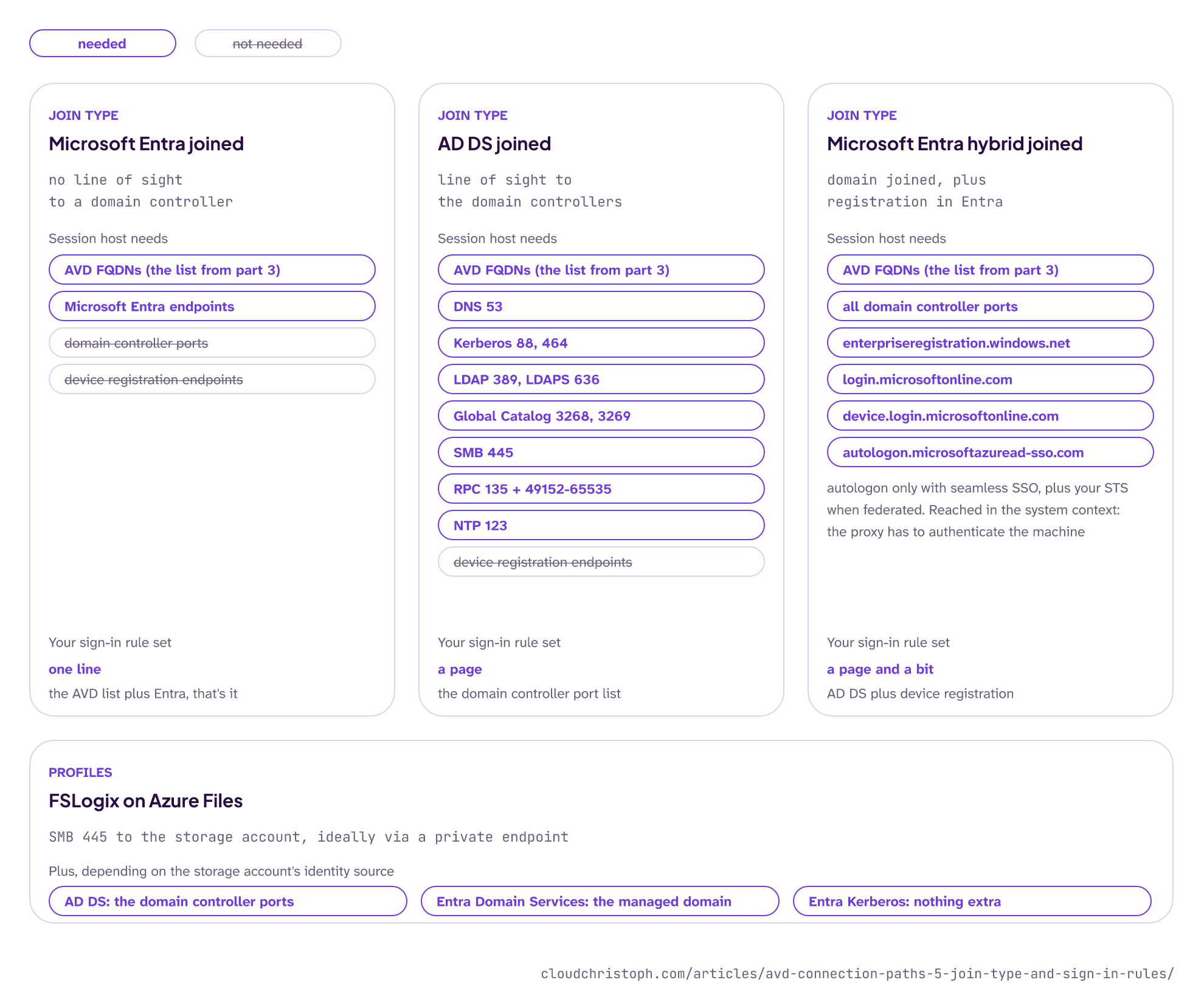
Here is the whole part in one picture, one column per join type:
Microsoft Entra joined
No line of sight to a domain controller. The Entra joined session hosts page says so directly; you only need a domain controller if users access on-prem resources from the session. The standard FQDN list from part 3 covers the AVD side. It explicitly leaves out the Microsoft Entra endpoints. In locked-down networks, add those as well: IDs 56 and 59 (sign-in and device registration) and 125 (certificate revocation) from Microsoft 365 URLs and IP address ranges. That is what my lab uses, and the network part stays short.
Active Directory Domain Services joined
The session host VNet has to reach your domain controllers and DNS servers (prerequisites). I haven’t found an AVD-specific port list for this. The closest general one is the firewall list for Active Directory domains and trusts:
| Service | Port |
|---|---|
| DNS | 53 TCP/UDP |
| Kerberos | 88 TCP/UDP |
| Kerberos password change | 464 TCP/UDP |
| LDAP | 389 TCP/UDP |
| LDAPS | 636 TCP |
| Global Catalog | 3268/3269 TCP |
| SMB | 445 TCP |
| RPC endpoint mapper plus dynamic range | 135 TCP, 49152-65535 TCP |
| Time | 123 UDP |
Not every scenario needs every port, but in practice the domain join and group policy processing will touch most of them. If the domain controllers sit on-prem, all of this crosses your VPN or ExpressRoute and usually the hub firewall too, so it belongs in the same firewall request as the AVD list.
Microsoft Entra hybrid joined
Everything from the AD DS list, plus:
enterpriseregistration.windows.netlogin.microsoftonline.comdevice.login.microsoftonline.comautologon.microsoftazuread-sso.com, if you use seamless SSO- your own security token service (STS), for federated domains
These are reached in the system context, not the user’s (network requirements, hybrid join troubleshooting). Microsoft also asks you to exclude device.login.microsoftonline.com and enterpriseregistration.windows.net from TLS inspection (see also “Scope the FQDNs exactly” in my article on tenant restrictions with Azure Firewall).
The classic in my projects: a hand-written firewall request that was missing half of this page. The AVD agent sat in Needs assistance, and the hybrid join never finished (dsregcmd /status: AzureAdJoined : NO). The FQDN tag from part 3 would have covered the agent’s half; the endpoints above aren’t in any tag.
FSLogix on Azure Files
Profiles add one more destination: SMB 445 to the storage account, ideally via a private endpoint (and when it doesn’t work, check your DNS first 😉). Which identity rules you need depends on the storage account’s identity source (Azure Files identity-based authentication). The FSLogix guide has the details for Entra Kerberos; here is the short version for all three:
| Storage account authentication | Extra rules from the session host |
|---|---|
| AD DS | The domain controller ports from the AD DS section |
| Microsoft Entra Domain Services | Connectivity to the managed domain |
| Microsoft Entra Kerberos | None, no domain controller needed |
How to check
- Join type first: before you write a single rule, find out how you plan to join the session hosts. It decides whether this part is one line or a page (and without the right rules, the join is the first thing that fails 😅).
- Entra joined: the FQDN list from part 3 plus the Entra endpoints;
WVDAgentUrlTool.exechecks the AVD part. - AD DS joined: test DNS resolution and the domain controller ports from the session host subnet (
nltest /dsgetdc:<domain>,Test-NetConnection <dc> -Port 389). - Hybrid joined: run
dsregcmd /statuson a session host and check that the device is registered; if it fails, look at the proxy and the system context first. - FSLogix:
Test-NetConnection <storageaccount>.file.core.windows.net -Port 445, and if you use Private Link for the storage account, check that the name resolves to the private endpoint.
Conclusion
The join type decides how long your identity rule set gets. Entra join keeps it short; AD DS and hybrid join bring the full domain controller port list back, and hybrid join adds device registration in the system context on top. FSLogix follows whatever authentication the storage account uses.
If you have the choice, Entra join is the one that makes the firewall team happiest (and me too).
Part 6 closes the series with the logs: how to find out which path every session took, and why the obvious column lies to you while the session is running.
Was this useful?
Noted. The next part is in the works. Get it by mail ↓

Comments