
The Connection Information dialog from part 1 tells you what one user got in one session. For a whole host pool you want the logs. Azure Virtual Desktop writes everything you need into Log Analytics, but the column that looks like the answer shows the wrong value while the session runs, and the reliable signals are not in Microsoft’s documentation. This part collects what I found out the slow way, so you don’t have to (most of it while staring at WVDCheckpoints at far too late an hour).
All queries from this part are also in the lab repo.
The tables
With diagnostics enabled on the host pool, these tables matter for connection paths (diagnostics with Log Analytics, table reference):
| Table | What’s in it |
|---|---|
WVDConnections |
One row per state of a connection: Started, Connected, Completed |
WVDCheckpoints |
Steps along the way, including everything about RDP Shortpath |
WVDErrors |
Errors, with a code and a message |
WVDConnectionNetworkData |
RTT and bandwidth estimates, every two minutes per active session |
WVDAgentHealthStatus |
Health of the AVD agent on each session host |
Trap 1: TransportType lies while the session runs
WVDConnections has a column TransportType, and it looks like exactly what we want. In my lab, it said TCP Websocket on the Started and Connected rows of every session, including the ones that ran on UDP the whole time. Only the Completed row, written when the session ends, carried the real value.
So a query on TransportType shows every running session as TCP. If you build a dashboard on it, you would assume Shortpath doesn’t work at all, at least until people log off.
The values themselves are a second surprise. Four sources, four vocabularies:
| Source | What it uses |
|---|---|
| Table reference | Shortpath, TURN, Websocket |
| My lab, Completed rows | TCP Websocket, ShortpathPublic, TURN Relay, ShortpathPrivate for the listener from part 4, and Multipath for Windows clients with Multipath |
| Sample query on the configure RDP Shortpath page | a column UdpUse with the values 1, 2 and 4, which the table reference doesn’t list and which does not exist in my workspace at all |
| AVD Insights (Insights use cases) | Multipath, Relay, ShortpathPublic and ShortpathPrivate for UDP, NotUsed for TCP |
Check what your workspace contains before you trust any example (including mine).
What tells the truth: checkpoints
The reliable live signal is in WVDCheckpoints. The table reference only lists the columns. The one hint Microsoft gives is a sample query that filters on Shortpath in the name and, according to the docs, lists all sessions that use UDP. That is not quite true, as trap 2 shows 🙄
These are the checkpoints I found useful. None of them are documented on Microsoft Learn; the names are what I saw in my workspace:
| Checkpoint | Source | What it tells you |
|---|---|---|
TransportTypeSelection |
Client | What the client offered. TransportTypeSelected=Unknown is the first sign that it did not offer UDP. |
ShortpathPublicLocalCandidatesReady |
RDStack | The session host’s ICE candidates, as JSON |
ShortpathRequested |
RDStack | Only with the listener from part 4: the private path was requested, with udpPort |
ShortpathEstablished |
RDStack | UDP is up. Parameters.initialUdpType says which kind. |
GatewayTransportReplacedByShortpath |
RDStack | The TCP path through the gateway was dropped |
ShortpathFallbackToGatewayTransport |
RDStack | UDP gave up. FallbackReason=NotSupported means the client did not offer UDP. |
The UDP type labels
initialUdpType in the ShortpathEstablished checkpoint is the most useful single value. The labels I saw:
initialUdpType |
Path |
|---|---|
ShortpathPrivate |
Listener on UDP 3390 (part 4) |
Shortpath_Relayed_UDP |
TURN relay (explained in part 3) |
Shortpath_Direct_UDP |
Direct: STUN, or ICE over a private path |
Shortpath_UDP_over_NAT |
Mostly direct (STUN), see the next paragraph |
Unknown |
No reliable statement, see trap 2 |
Both direct labels showed up for direct STUN paths, Direct_UDP on the on-prem LAN and UDP_over_NAT on the guest network. ICE over the VPN in part 4 also showed up as Shortpath_Direct_UDP, so the label alone doesn’t tell you whether the path was public or private. The firewall log does (see the firewall section). One Windows session with Shortpath_UDP_over_NAT most likely ran over the relay, judging by its round-trip time.
What makes the session host pick one label or the other is not documented. My guess: it depends on which kind of candidate the winning pair was built on, but I couldn’t prove it.
Trap 2: Multipath checkpoints say UDP when there is none
With Windows clients and Multipath, it gets trickier. In two of my tests the client showed Multipath Websocket, so no UDP at all. The logs still had both ShortpathEstablished and GatewayTransportReplacedByShortpath, with initialUdpType = Unknown. In two other tests the client did run on UDP, and the checkpoints looked exactly the same.
So for Multipath sessions, those two checkpoints alone prove nothing. Only a concrete initialUdpType such as Shortpath_Relayed_UDP does.
Checkpoints can also be missing entirely. One Windows session that ran on relay UDP had neither TransportConnected nor ShortpathEstablished, only GatewayTransportReplacedByShortpath. That is why the query later in this part never puts a Multipath session into the “TCP” bucket just because a checkpoint is absent.
A smaller timing trap with the same clients: on Windows, ShortpathEstablished can be logged before the Connected row in WVDConnections, because Connected is written after the logon. If you calculate “seconds until UDP”, measure against the TransportConnected checkpoint, not against Connected. It was missing in 2 of my 34 sessions; fall back to the Started row then.
The other way round: UDP the dialog doesn’t show
The opposite happens too. With the listener and TURN blocked, Windows App 2.0.1484 showed Multipath Websocket in all three sessions, while initialUdpType said ShortpathPrivate (part 4). To settle it, I read the RemoteFX Network counters on the session host while a session was running (via az vm run-command):
Get-Counter '\RemoteFX Network(*)\Current UDP RTT','\RemoteFX Network(*)\Current UDP Bandwidth',
            '\RemoteFX Network(*)\Current TCP RTT','\RemoteFX Network(*)\Current TCP Bandwidth' -SampleInterval 10 -MaxSamples 6
Three samples from that session:
| Time into the session | UDP RTT | UDP bandwidth (kbps) | TCP RTT | TCP bandwidth |
|---|---|---|---|---|
| 0:41 | 58 ms | 110,480 | 400 ms | 512 |
| 1:14 | 39 ms | 237,891 | 400 ms | 512 |
| 1:58 | 45 ms | 237,891 | 400 ms | 512 |
The UDP values follow the load; the TCP values sit at 400 and 512, which look like placeholders. The data runs over UDP, and the dialog’s “Greater than 237 Mbps” is exactly the UDP estimate. Only the label is wrong.
Reading the candidates
ShortpathPublicLocalCandidatesReady holds the session host’s candidates in Parameters.json. I saw two formats:
Candidates{...}with atypeper entry (0 = host, 1 = server reflexive, 3 = relay), plusnatAddressandserverAddress.interfaces{...}withstun,turn,coneShapedNat, and the session host’s own assessment inestimateandestimateCode, for example “UDP OK. NAT indeterminate. Cannot predict success.”
This is where you see the effects from part 2 and part 3: no relay candidate means TURN is disabled or blocked, no server reflexive candidate means STUN is disabled or UDP 3478 is blocked, and one local port with two different public ports for two STUN servers means a symmetric NAT in front of the session host.
A query that classifies every session
This query joins the final state from WVDConnections with the checkpoints and puts each session into one bucket:
let lookback = 1d;
let connections = WVDConnections
    | where TimeGenerated > ago(lookback)
    | summarize
        Started = minif(TimeGenerated, State == "Started"),
        FinalTransport = take_anyif(TransportType, State == "Completed"),
        UserName = take_any(UserName),
        ClientType = take_any(ClientType),
        ClientVersion = take_any(ClientVersion),
        SessionHostName = take_any(SessionHostName)
        by CorrelationId;
let shortpath = WVDCheckpoints
    | where TimeGenerated > ago(lookback)
    | where Name in ("ShortpathEstablished", "ShortpathFallbackToGatewayTransport", "ShortpathPublicLocalCandidatesReady")
    | summarize
        UdpType = take_anyif(tostring(Parameters.initialUdpType), Name == "ShortpathEstablished"),
        FallbackReason = take_anyif(tostring(Parameters.FallbackReason), Name == "ShortpathFallbackToGatewayTransport"),
        CandidateRows = countif(Name == "ShortpathPublicLocalCandidatesReady")
        by CorrelationId;
connections
| join kind=leftouter shortpath on CorrelationId
| extend Path = case(
    UdpType == "ShortpathPrivate" or FinalTransport == "ShortpathPrivate", "UDP private (listener)",
    UdpType == "Shortpath_Relayed_UDP" or FinalTransport == "TURN Relay", "UDP via TURN relay",
    UdpType in ("Shortpath_Direct_UDP", "Shortpath_UDP_over_NAT") or FinalTransport == "ShortpathPublic", "UDP direct (STUN or private ICE)",
    FallbackReason == "NotSupported", "TCP: client did not offer UDP",
    UdpType == "Unknown" or FinalTransport == "Multipath", "Unclear (Multipath, check the session host)",
    CandidateRows > 0 and isempty(UdpType), "TCP: candidates ready, UDP never came up",
    isempty(FinalTransport), "Still running or no data",
    "TCP")
| project Started, UserName, ClientType, ClientVersion, SessionHostName, Path, UdpType, FinalTransport, CorrelationId
| order by Started desc
I ran it against my lab workspace for the whole test period of this series, 84 sessions:
| Path | macOS | Windows |
|---|---|---|
| UDP private (listener) | 6 | 5 |
| UDP direct (STUN or private ICE) | 12 | 1 |
| UDP via TURN relay | 1 | 6 |
| Unclear (Multipath, check the session host) | 0 | 25 |
| TCP: candidates ready, UDP never came up | 21 | 3 |
| TCP: client did not offer UDP | 1 | 0 |
| TCP | 1 | 2 |
The Mac’s biggest bucket is “candidates ready, UDP never came up”, which is the client not sending its checks from part 4. Almost a third of all sessions is “unclear”, because Windows Multipath sessions log Unknown. For those, the counters on the session host are the only proof I found.
Summarize by Path and ClientType and you get the picture from part 1 for your whole user base: which clients go direct, which use the relay, and which never get UDP.
// append to the classification query instead of its last two lines
| summarize Sessions = count() by ClientType, Path
| order by ClientType asc, Sessions desc
The bucket “candidates ready, UDP never came up” is the one to watch. It is the non-deterministic case from part 1: the session host was ready, nothing failed, and the session still stayed on TCP.
Network data: don’t compare apples and oranges
WVDConnectionNetworkData has EstRoundTripTimeInMs and EstAvailableBandwidthKBps every two minutes (connection latency).
For my Mac sessions on direct UDP, the session averages in the logs came to 30 to 61 Mbps and 40 to 50 ms, against 37 to 68 Mbps and 24 to 31 ms in the Connection Information dialog. Bandwidth roughly agrees; the round-trip time in the logs is consistently higher. The logs store averages per two-minute interval and the dialog shows the current value, so don’t put both on one slide without saying so.
The agent after network changes
For the egress problem from part 2 and part 3, WVDAgentHealthStatus shows when a session host was unavailable:
WVDAgentHealthStatus
| where TimeGenerated > ago(1d)
| sort by SessionHostName asc, TimeGenerated asc
| extend PrevStatus = prev(Status), PrevHost = prev(SessionHostName)
| where Status != PrevStatus or SessionHostName != PrevHost   // status changes only
| project TimeGenerated, SessionHostName, Status, EndpointState, LastHeartBeat, ActiveSessions
The table writes a row about every 30 seconds, so the raw output is long. With only the status changes, my egress switches fit in 13 lines: two short Unavailable phases (28 and 45 seconds) and the Shutdown rows of the host restarts. And LastHeartBeat only moves when the status changes, so don’t use it as a liveness signal.
The status flips to unavailable and back within a minute or two. The real outage, failing connections for several minutes afterward, shows up in WVDErrors and in connections that never reach Connected, not in the health status.
Firewall logs: who checks whom
If the traffic between client and session host passes Azure Firewall, its network rule log shows which side sent first. That was the key to part 4. Filter on UDP to or from the session host and leave out port 3478, because the session host talks to STUN and TURN all the time, even without sessions. Keep the time window short, around one connect:
AZFWNetworkRule
| where TimeGenerated between (datetime(2026-10-15 12:00:25) .. datetime(2026-10-15 12:00:45))
| where Protocol == "UDP" and (SourceIp == "10.3.17.11" or DestinationIp == "10.3.17.11")
| where DestinationPort != 3478
| project TimeGenerated, SourceIp, DestinationIp, DestinationPort, Action
| order by TimeGenerated asc
To watch it live instead of querying afterward, az-firewall-watch streams the same log from an Event Hub into your terminal.
Two Mac sessions from part 4, same setup, two hours apart. Without the listener, only the session host sends, about 30 seconds into the session, to the client’s tunnel address and its two LAN addresses:
| Time (UTC) | Source | Destination | Port | Action |
|---|---|---|---|---|
| 12:00:33.98 | 10.3.17.11 |
192.168.10.3 |
50967 | Allow |
| 12:00:34.04 | 10.3.17.11 |
10.1.10.159 |
64151 | Allow |
| 12:00:34.11 | 10.3.17.11 |
10.1.10.86 |
50327 | Allow |
With the listener, the client sends first, and one packet is enough:
| Time (UTC) | Source | Destination | Port | Action |
|---|---|---|---|---|
| 14:17:12.65 | 192.168.10.3 |
10.3.17.11 |
3390 | Allow |
A row from client to session host means the client checked. Only rows from session host to client mean it didn’t, and on a stateful return path nothing will come of the session host’s checks.
Which path is really running?
Put together, this is how I check a single session now, starting from the Activity ID in the client:
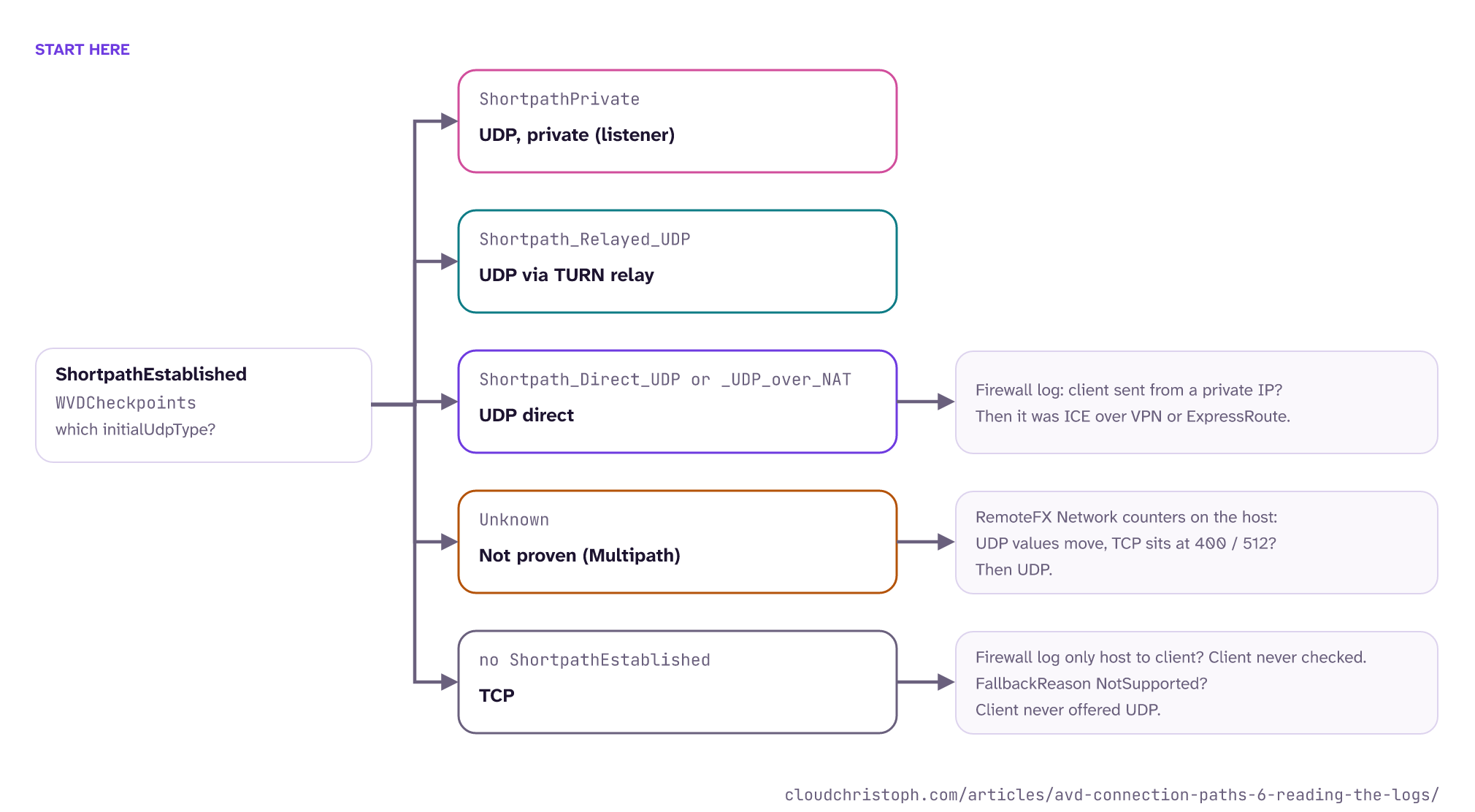
What I no longer use as proof of the running path (they’re still fine for the first look from part 1, and to see whether UDP can work):
-
The Connection Information dialog.
On the Mac it used three different labels for private paths, and on Windows it showed
Multipath Websocketfor UDP (part 4). -
avdnettest.exe.It said “very likely to work” in every VPN variant without the TURN block, while the Windows client got UDP in none of the first nine sessions. And in one session where it had failed, the client got UDP anyway. The same limit applies to my own avd-shortpath-test on macOS and Linux, because it only tests the network.
-
The client’s own health check.
On the Mac it reported the TURN relay as unreachable under a full tunnel, in the same setup where TURN answered through the tunnel.
-
Client logs.
The macOS client only logs errors, and the interesting part of the Windows client sits in trace files you can’t decode without Microsoft’s format files. Keep them for a support case.
Conclusion
Don’t judge running sessions by TransportType: it is only final on the Completed row. The truth is in WVDCheckpoints, above all initialUdpType in ShortpathEstablished. For Windows Multipath sessions, only a concrete value there or the counters on the session host prove UDP. The checkpoint names come from my workspace, not from the docs, so test the queries in yours before you build a dashboard on them.
That’s the series. The checklist sums up everything from all six parts in one place. Hope it helps!
Have you seen different results, with other clients, other regions, or over ExpressRoute? I would love to compare notes in the comments.
This post reflects my personal opinion and lab results, not the position of Microsoft or my employer. Your feedback is always welcome!
Was this useful?
Noted. The next part is in the works. Get it by mail ↓

Comments